This is a career that I wanted to create for a long time.
I went to dogschool myself with my little puppy and I would love to give my sims the chance to do the same.
Chancecards
Both careers have all chancecards. I'm not going to give the information on the chancecards.
They have all 50% chance of happening (except for one 75%).
If you want to have other chancecards go here: http://bit.ly/SjF9D6
Required EP's
You don't need the EP pets for the teen career, so still if you don't have the EP pets you can enjoy dogschool (with a dog from the school or something).
Of course you need the EP Pets for the petcareer.
Download:
Teen career: http://simfileshare.net/folder/84038/
Pet career: http://simfileshare.net/folder/84038/
Level 1
Title Little starter
Description Socialising is the most important goal in the first class you attend. The first thing you will learn is to teach your pet sit up. Your pet and you will learn how to communicate with each other. The most important aspects for that are your voice and posture. The second class is also included in this level. You have to prove you have the logic and charisma to be consistent about giving a reward. Pets need to be rewarded within seconds of doing the thing you asked.
Wages -30
Days Wednesday Saturday
Starthour 16.00
Working hours 2.00
Outfit Everyday
Carpool Taxi
Level 2
Title Youngster
Description The first two classes are behind you. You're a youngster now. It's not going to get easier though. It's time to teach your pet to speak up and letting him telling you what he wants. So teach him how to say "I'm hungry" and "I have to go." and you'll be in the highest class before you know it.
Wages -20
Days Wednesday Saturday
Starthour 16.00
Working hours 2.00
Outfit Everyday
Carpool Sedan
Cooking + -
Mechanical + -
Body + -
Charisma + 1
Creativity + 0
Logic + 1
Cleaning + -
Friends + -
Level 3
Title Advance
Description Finally you made it. You're in the highest class and the only thing to do now is to enjoy your pet's company. He still has to listen to you and you can still learn him new things. But you're there. You have the best and most loyal friend men can ever get.
Wages -10
Days Wednesday Saturday
Starthour 16.00
Working hours 2.00
Outfit Everyday
Carpool Sedan
Cooking + -
Mechanical + -
Body + -
Charisma + 2
Creativity + 1
Logic + 0
Cleaning + -
Friends + -
Level 1
Title Little One
Description Socialising is the most important goal in the first class you attend. The first thing you will learn is sit up. Your human and you will learn how to communicate with each other. The most important aspects for that are your human's voice and the posture of you both.
Wages -50
Days Wednesday Saturday
Starthour 16.00
Working hours 2.00
Outfit 0
Carpool Taxi
Level 2
Title Starter
Description In this class you'll get harder exercises than the class for the little ones. The good news is that your human will learn that giving a reward is the most important thing. So hopefully you understand what your human wants you to do, but remember to go easy on that candy. The hardest thing to learn is Stay. You need to stay on the same spot while your human goes further away with your reward. You'll need to work hard to go to the youngster class.
Wages -30
Days Wednesday Saturday
Starthour 16.00
Working hours 2.00
Outfit 0
Carpool Sedan
Cooking + Sit up
Mechanical + -
Body + -
Charisma + -
Creativity + -
Logic + -
Cleaning + -
Friends + -
Level 3
Title Youngster
Description The first two classes are behind you. You're a youngster now. It's not going to get easier. It's time to speak up to your human and tell him what you want. So speak and you'll be in the highest class before you know it.
Wages -20
Days Wednesday Saturday
Starthour 16.00
Working hours 2.00
Outfit 0
Carpool Sedan
Cooking + Stay
Mechanical + -
Body + -
Charisma + -
Creativity + -
Logic + -
Cleaning + -
Friends + -
Level 4
Title Advance
Description Finally you made it. You're in the highest class and the only thing to do now is to enjoy your human's company. You still have to listen to him and you can still learn new things. But you're there. You're men's best friend.
Wages -10
Days Wednesday Saturday
Starthour 16.00
Working hours 2.00
Outfit 0
Carpool Sedan
Cooking + Speak
Mechanical + -
Body + -
Charisma + -
Creativity + -
Logic + -
Cleaning + -
Friends + -
Original icon
http://youngpeople.ndcsbuzz.org.uk/images/library/LI4FE44546CD490.jpg
Thanks
If you like this creation, please, press the thanks button and/or leave a comment. Feedback always keeps a creator going for making more new stuff.
FAQ
The careers don't show up in my game: http://bit.ly/MxB7bk
If you have more questions, please, use the comment section.
If you have any problems with the careers, please, give as much information as possible in order for me to help.
Additional Credits:
Wooden UI by Calidan (MTS) http://bit.ly/1aKIKpW
Job Seeking Board by Moghughson (MTS) http://bit.ly/tLUmNg
Adobe Photoshop CS4
SimPE, the requester
Numenor’s Anygamestarter
Sunday, June 21, 2015

Wednesday, June 17, 2015
New mod: Vampire decay by night
By request from ikhouvanjou, I modified the mod made by Monique: http://www.modthesims.info/download.php?t=96211
I couldn't find Monique's policy, but linolino also made an alternative version like this one (http://www.modthesims.info/download.php?t=256913) . The moment that I'm told to take this mod down, I will.
What it does
By default none of the motives of a vampire decreases by night.
With this mod only the motives fun, social, energy and hunger will decrease by night.
Testing: Does it work?
This was tested by the requester ikhouvanjou.
It was tested with all EP's and SP's installed (complete collection).
It also works with only Nightlife installed.
It works with all kind of vampire-hybrids.
If you notice any problem, please, let me know.
Download:
SFS: http://simfileshare.net/folder/84038/
It can be found under: Sims 2 Idea > Game Mods > Global Mods > Gameplay Changes
Policy
Please give credit with a link when using my work. (e.g. PTO in careers)
Ask me first before modifying/using. (e.g. PTO in careers)
Let me know if you use my work. (e.g. PTO in careers)
I couldn't find Monique's policy, but linolino also made an alternative version like this one (
What it does
By default none of the motives of a vampire decreases by night.
With this mod only the motives fun, social, energy and hunger will decrease by night.
Testing: Does it work?
This was tested by the requester ikhouvanjou.
It was tested with all EP's and SP's installed (complete collection).
It also works with only Nightlife installed.
It works with all kind of vampire-hybrids.
If you notice any problem, please, let me know.
Download:
SFS: http://simfileshare.net/folder/84038/
It can be found under: Sims 2 Idea > Game Mods > Global Mods > Gameplay Changes
Policy
Please give credit with a link when using my work. (e.g. PTO in careers)
Ask me first before modifying/using. (e.g. PTO in careers)
Let me know if you use my work. (e.g. PTO in careers)
Saturday, June 13, 2015
TS4 New Aging Mod: Realistic Ages 1 Month
This mod will be updated to the Toddler patch on 2017-01-25!
Go here for the update: http://s2idownloads.blogspot.com/2017/01/ts4-new-aging-mod-update-realistic-ages.html
Introduction
With every sims game I love to play with the same lifespans. For The Sims 2 I found the ideal balance (for me that's Realistic Ages 1 Month). For Sims 3 you can change the lifespans as much as you want, so there's no need for a mod.
And now I'm so glad I can announce I made a mod for The Sims 4 realistic ages 1 month.
It has (for normal) the same lengths as my Realistic Ages 1 Month mod for The Sims 2.
Short divides the lengths in half. Long doubles the lengths.
Additional info
Originally my idea was to create a mod 3 in 1. So short would have been realistic ages 1 year, normal realistic ages 1 month and long realistic ages 1 day.
During the making of such a mod I noticed that the longest an age can be is 1548 days. So I decided to make 2 seperate mods (realistic ages 1 month and 1 year (which is upcoming)). So it appears it's not possible to create a mod realistic ages 1 day for sims 4.
Requests
I understand that there will be people who would like to see different spans for the different ages as I made.
I wrote a tutorial to help you make your own lifespan: http://bit.ly/TutorialTS4
Lifespan changes
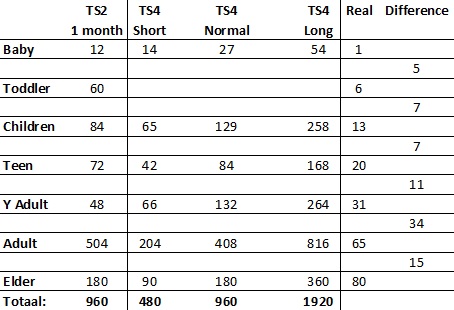
As you can see I added 1/4 of the length of the toddler stage (TS2) to the baby stage (TS4) and I added 3/4 of the toddler stage (TS2) to the child stage (TS4).
Compatibility
This mod is based on Game Version 1.0.732.20. If you notice any problems, please, let me know.
Conflicts
This mod edits the AgeTuning XML, and will conflict with any other mod that does the same.
There are already some other versions of the AgeTuning XML so remember this!
Download
http://bit.ly/TS4PRA1MonthFile
Update March 26 2015, game version 1.5.139.1020
If your game is updated to the patch that game out on March 26 2015 or above, then you need the updated version.
Install
Unzip the archive and place the .package file in your Electronic Arts/The Sims 4/Mods folder.
Or if you haven't done this yet, do the following first:
1. - Drop the .package in /Mods as usual
2. - Make an empty folder named "unpackedmod" in /Mods
3. - In your resource.cfg, add the line
DirectoryFiles unpackedmod autoupdate
(i.e.: open that file in a text editor and add the line "DirectoryFiles unpackedmod autoupdate" (without quotes) underneath whatever other text it has.)
Thanks to Plasticbox for the instructions
Thanks
If you like this creation, please, press the thanks button and/or leave a comment. Feedback always keeps a creator going for making more new stuff.
Additional Credits
S4PE and Dark Gaia who kindly gave permission to use his mod
I accept requests full time!
If you have a request please go here: bit.ly/p9ymWC
Please, don't upload these creations anywhere. If you want to share them, share by the button Twitter, Facebook,...
Or share this link anywhere: http://bit.ly/fSnciT

Go here for the update: http://s2idownloads.blogspot.com/2017/01/ts4-new-aging-mod-update-realistic-ages.html
Introduction
With every sims game I love to play with the same lifespans. For The Sims 2 I found the ideal balance (for me that's Realistic Ages 1 Month). For Sims 3 you can change the lifespans as much as you want, so there's no need for a mod.
And now I'm so glad I can announce I made a mod for The Sims 4 realistic ages 1 month.
It has (for normal) the same lengths as my Realistic Ages 1 Month mod for The Sims 2.
Short divides the lengths in half. Long doubles the lengths.
Additional info
Originally my idea was to create a mod 3 in 1. So short would have been realistic ages 1 year, normal realistic ages 1 month and long realistic ages 1 day.
During the making of such a mod I noticed that the longest an age can be is 1548 days. So I decided to make 2 seperate mods (realistic ages 1 month and 1 year (which is upcoming)). So it appears it's not possible to create a mod realistic ages 1 day for sims 4.
Requests
I understand that there will be people who would like to see different spans for the different ages as I made.
I wrote a tutorial to help you make your own lifespan: http://bit.ly/TutorialTS4
Lifespan changes
As you can see I added 1/4 of the length of the toddler stage (TS2) to the baby stage (TS4) and I added 3/4 of the toddler stage (TS2) to the child stage (TS4).
Compatibility
This mod is based on Game Version 1.0.732.20. If you notice any problems, please, let me know.
Conflicts
This mod edits the AgeTuning XML, and will conflict with any other mod that does the same.
There are already some other versions of the AgeTuning XML so remember this!
Download
http://bit.ly/TS4PRA1MonthFile
Update March 26 2015, game version 1.5.139.1020
If your game is updated to the patch that game out on March 26 2015 or above, then you need the updated version.
Install
Unzip the archive and place the .package file in your Electronic Arts/The Sims 4/Mods folder.
Or if you haven't done this yet, do the following first:
1. - Drop the .package in /Mods as usual
2. - Make an empty folder named "unpackedmod" in /Mods
3. - In your resource.cfg, add the line
DirectoryFiles unpackedmod autoupdate
(i.e.: open that file in a text editor and add the line "DirectoryFiles unpackedmod autoupdate" (without quotes) underneath whatever other text it has.)
Thanks to Plasticbox for the instructions
Thanks
If you like this creation, please, press the thanks button and/or leave a comment. Feedback always keeps a creator going for making more new stuff.
Additional Credits
S4PE and Dark Gaia who kindly gave permission to use his mod
I accept requests full time!
If you have a request please go here: bit.ly/p9ymWC
Please, don't upload these creations anywhere. If you want to share them, share by the button Twitter, Facebook,...
Or share this link anywhere: http://bit.ly/fSnciT
Thursday, June 11, 2015
New food: Atlantic Sub Sandwich
This is a delicious sub sandwich based on salmon, philadelphia cheese, onion and cress. (And is really delicious in real life too!).
It's inspired by the same named sub sandwich from the sub sandwich store in my hometown.
It's cloned from lunch meat sandwich and I used the mesh provided by TNW and I also recolored the original textures.
There's a whole list of Sub Sandwiches I want to create (The Sub Sandwiches from the Sub store in my hometownhttp://bit.ly/1isqnXR) .
So keep looking for more to come soon.
Here you can find an overview of the subs I already made (press the tab Food):http://bit.ly/allcreations
There you can download them all at once too. Including the ones not uploaded anywhere yet.
This Atlantic sub sandwich is based on salmon, philadelphia cheese, onion and cress.

Where and when to find it
It's for lunch and dinner only.
It's found in the fridge under have Menssana Sub.../Atlantic or serve Menssana Sub.../Atlantic
All my sandwiches will be created this way. So you can find them all in the fridge under have Menssana Sub.../"Name of the sandwich" or serve Menssana Sub.../"Name of the sandwich".
It requires no cooking skill.
The sims eat this with their hands (it's all exactly the same as the meat lunch sandwich).
Poly counts
Really high, but reduced (by TNW) where possible.
Ingredients Tray is 816
Prep State is 1,698.
Single Serving is 2,386.
Serving Size is 7,158.
Single Serve and Plate is 2,586
Some extra's
I already made some sub sandwiches and there are many more to come. It might be a nice idea to open a Sub Store in your game, but there are a few things you need to know then:
- The name of the sub store in my hometown is Menssana
- The poly counts are quite high: be careful with putting a lot of sandwiches in your sub store especially when you have an older computer.
As this is cloned from lunch meat sandwiches there is a chance that your sims role a new want: "eating/preparing ... sub sandwich" like they role a want for the lunch meat sandwich.
There is a chance that when your fridge is full with fresh ingredients the sub sandwiches sparkle (as they are also made with vegetables and fresh ingredients).
I hope you like these extra's
One issue
When preparing a group meal the plate won't be empty when all the subs from the plate have been served. This is an error I can't help because I cloned this from lunch meat sandwich and the mesh TNW made. It also happens with the original sub sandwiches TNW made so I can't do nothing about it.
Download
SFS: http://www.simfileshare.net/folder/84038
FAQ
Can you create a sub sandwich or another food item for me?
Yes, I can. But as I said there are many more subs to come. So the one you want is probably one I'm already going to create.
If it's not, just remember I recolor the sub sandwiches. I don't create new meshes.
Same for other food items. It depends on which food it is, but it's probably not a problem to clone and recolor it.
Just ask and I'll let you know if I can do it or not.
Thanks
If you like this creation, please, press the thanks button and/or leave a comment.
Feedback always keeps a creator going for making more new stuff (in this case sub sandwiches).
Policy
Please give credit with a link when using my work.
Ask me first before modifying/using.
Let me know if you use my work.
Additional Credits:
Meshes and original textures made by uncle808us at turbosquid.com
TheNinthWave for converting the meshes to use in Sims 2: (Found here:http://www.theninthwavesims.com/2012/10/the-sims-2-sub-sandwiches.html )
GIMP 2
www.menssana.be
Wooden UI by Calidan (MTS)http://bit.ly/1aKIKpW
SimPE
Numenor's Anygamestarter
The dress was made by LientebollemeiS2I
Please, don't upload these creations anywhere. If you want to share them, share by the button Twitter, Facebook,...
Or share this link anywhere: http://bit.ly/fSnciT
It's inspired by the same named sub sandwich from the sub sandwich store in my hometown.
It's cloned from lunch meat sandwich and I used the mesh provided by TNW and I also recolored the original textures.
There's a whole list of Sub Sandwiches I want to create (The Sub Sandwiches from the Sub store in my hometown
So keep looking for more to come soon.
Here you can find an overview of the subs I already made (press the tab Food):
There you can download them all at once too. Including the ones not uploaded anywhere yet.
This Atlantic sub sandwich is based on salmon, philadelphia cheese, onion and cress.

It's for lunch and dinner only.
It's found in the fridge under have Menssana Sub.../Atlantic or serve Menssana Sub.../Atlantic
All my sandwiches will be created this way. So you can find them all in the fridge under have Menssana Sub.../"Name of the sandwich" or serve Menssana Sub.../"Name of the sandwich".
It requires no cooking skill.
The sims eat this with their hands (it's all exactly the same as the meat lunch sandwich).
Poly counts
Really high, but reduced (by TNW) where possible.
Ingredients Tray is 816
Prep State is 1,698.
Single Serving is 2,386.
Serving Size is 7,158.
Single Serve and Plate is 2,586
Some extra's
I already made some sub sandwiches and there are many more to come. It might be a nice idea to open a Sub Store in your game, but there are a few things you need to know then:
- The name of the sub store in my hometown is Menssana
- The poly counts are quite high: be careful with putting a lot of sandwiches in your sub store especially when you have an older computer.
As this is cloned from lunch meat sandwiches there is a chance that your sims role a new want: "eating/preparing ... sub sandwich" like they role a want for the lunch meat sandwich.
There is a chance that when your fridge is full with fresh ingredients the sub sandwiches sparkle (as they are also made with vegetables and fresh ingredients).
I hope you like these extra's
One issue
When preparing a group meal the plate won't be empty when all the subs from the plate have been served. This is an error I can't help because I cloned this from lunch meat sandwich and the mesh TNW made. It also happens with the original sub sandwiches TNW made so I can't do nothing about it.
Download
SFS: http://www.simfileshare.net/folder/84038
FAQ
Can you create a sub sandwich or another food item for me?
Yes, I can. But as I said there are many more subs to come. So the one you want is probably one I'm already going to create.
If it's not, just remember I recolor the sub sandwiches. I don't create new meshes.
Same for other food items. It depends on which food it is, but it's probably not a problem to clone and recolor it.
Just ask and I'll let you know if I can do it or not.
Thanks
If you like this creation, please, press the thanks button and/or leave a comment.
Feedback always keeps a creator going for making more new stuff (in this case sub sandwiches).
Policy
Please give credit with a link when using my work.
Ask me first before modifying/using.
Let me know if you use my work.
Additional Credits:
Meshes and original textures made by uncle808us at turbosquid.com
TheNinthWave for converting the meshes to use in Sims 2: (Found here:
GIMP 2
Wooden UI by Calidan (MTS)
SimPE
Numenor's Anygamestarter
The dress was made by LientebollemeiS2I
Please, don't upload these creations anywhere. If you want to share them, share by the button Twitter, Facebook,...
Or share this link anywhere: http://bit.ly/fSnciT
Wednesday, June 10, 2015
New food: A Frenchman Sub Sandwich
This is a delicious sub sandwich based on brie, honey, grapes and cress.
It's inspired by the same named sub sandwich from the sub sandwich store in my hometown.
It's cloned from lunch meat sandwich and I used the mesh provided by TNW and I also recolored the original textures.
There's a whole list of Sub Sandwiches I want to create (The Sub Sandwiches from the Sub store in my hometownhttp://bit.ly/1isqnXR) .
So keep looking for more to come soon.
Here you can find an overview of the subs I already made (press the tab Food):http://bit.ly/allcreations
There you can download them all at once too. Including the ones not uploaded anywhere yet.
This Frenchman sub sandwich is based on brie, honey, grapes and cress.

Download
SFS: http://www.simfileshare.net/folder/84038
Where and when to find it
It's for lunch and dinner only.
It's found in the fridge under have lunch (or dinner).../A Frenchman Sub or serve lunch (or dinner).../A Frenchman Subs
All my sub sandwiches will be created this way. So you can find them all in the fridge under have lunch (or dinner).../"Name of the sandwich" Sub or serve lunch (or dinner).../"Name of the sandwich" Subs.
It requires no cooking skill.
The sims eat this with their hands (it's all exactly the same as the meat lunch sandwich).
Poly counts
Really high, but reduced (by TNW) where possible.
Ingredients Tray is 816
Prep State is 1,698.
Single Serving is 2,386.
Serving Size is 7,158.
Single Serve and Plate is 2,586
Some extra's
I already made some sub sandwiches and there are many more to come. It might be a nice idea to open a Sub Store in your game, but there are a few things you need to know then:
- The name of the sub store in my hometown is Menssana
- The poly counts are quite high: be careful with putting a lot of sandwiches in your sub store especially when you have an older computer.
As this is cloned from lunch meat sandwiches there is a chance that your sims role a new want: "eating/preparing ... sub sandwich" like they role a want for the lunch meat sandwich.
There is a chance that when your fridge is full with fresh ingredients the sub sandwiches sparkle (as they are also made with vegetables and fresh ingredients).
I hope you like these extra's
One issue
When preparing a group meal the plate won't be empty when all the subs from the plate have been served. This is an error I can't help because I cloned this from lunch meat sandwich and the mesh TNW made. It also happens with the original sub sandwiches TNW made so I can't do nothing about it.
FAQ
Can you create a sub sandwich or another food item for me?
Yes, I can. But as I said there are many more subs to come. So the one you want is probably one I'm already going to create.
If it's not, just remember I recolor the sub sandwiches. I don't create new meshes.
Same for other food items. It depends on which food it is, but it's probably not a problem to clone and recolor it.
Just ask and I'll let you know if I can do it or not.
Thanks
If you like this creation, please, press the thanks button and/or leave a comment.
Feedback always keeps a creator going for making more new stuff (in this case sub sandwiches).
Policy
Please give credit with a link when using my work.
Ask me first before modifying/using.
Let me know if you use my work.
Additional Credits:
Meshes and original textures made by uncle808us at turbosquid.com
TheNinthWave for converting the meshes to use in Sims 2: (Found here:http://www.theninthwavesims.com/2012/10/the-sims-2-sub-sandwiches.html )
GIMP 2
www.menssana.be
Wooden UI by Calidan (MTS)http://bit.ly/1aKIKpW
SimPE
Numenor's Anygamestarter
The dress was made by LientebollemeiS2I
Please, don't upload these creations anywhere. If you want to share them, share by the button Twitter, Facebook,...
Or share this link anywhere: http://bit.ly/fSnciT
It's inspired by the same named sub sandwich from the sub sandwich store in my hometown.
It's cloned from lunch meat sandwich and I used the mesh provided by TNW and I also recolored the original textures.
There's a whole list of Sub Sandwiches I want to create (The Sub Sandwiches from the Sub store in my hometown
So keep looking for more to come soon.
Here you can find an overview of the subs I already made (press the tab Food):
There you can download them all at once too. Including the ones not uploaded anywhere yet.
This Frenchman sub sandwich is based on brie, honey, grapes and cress.

Download
SFS: http://www.simfileshare.net/folder/84038
Where and when to find it
It's for lunch and dinner only.
It's found in the fridge under have lunch (or dinner).../A Frenchman Sub or serve lunch (or dinner).../A Frenchman Subs
All my sub sandwiches will be created this way. So you can find them all in the fridge under have lunch (or dinner).../"Name of the sandwich" Sub or serve lunch (or dinner).../"Name of the sandwich" Subs.
It requires no cooking skill.
The sims eat this with their hands (it's all exactly the same as the meat lunch sandwich).
Poly counts
Really high, but reduced (by TNW) where possible.
Ingredients Tray is 816
Prep State is 1,698.
Single Serving is 2,386.
Serving Size is 7,158.
Single Serve and Plate is 2,586
Some extra's
I already made some sub sandwiches and there are many more to come. It might be a nice idea to open a Sub Store in your game, but there are a few things you need to know then:
- The name of the sub store in my hometown is Menssana
- The poly counts are quite high: be careful with putting a lot of sandwiches in your sub store especially when you have an older computer.
As this is cloned from lunch meat sandwiches there is a chance that your sims role a new want: "eating/preparing ... sub sandwich" like they role a want for the lunch meat sandwich.
There is a chance that when your fridge is full with fresh ingredients the sub sandwiches sparkle (as they are also made with vegetables and fresh ingredients).
I hope you like these extra's
One issue
When preparing a group meal the plate won't be empty when all the subs from the plate have been served. This is an error I can't help because I cloned this from lunch meat sandwich and the mesh TNW made. It also happens with the original sub sandwiches TNW made so I can't do nothing about it.
FAQ
Can you create a sub sandwich or another food item for me?
Yes, I can. But as I said there are many more subs to come. So the one you want is probably one I'm already going to create.
If it's not, just remember I recolor the sub sandwiches. I don't create new meshes.
Same for other food items. It depends on which food it is, but it's probably not a problem to clone and recolor it.
Just ask and I'll let you know if I can do it or not.
Thanks
If you like this creation, please, press the thanks button and/or leave a comment.
Feedback always keeps a creator going for making more new stuff (in this case sub sandwiches).
Policy
Please give credit with a link when using my work.
Ask me first before modifying/using.
Let me know if you use my work.
Additional Credits:
Meshes and original textures made by uncle808us at turbosquid.com
TheNinthWave for converting the meshes to use in Sims 2: (Found here:
GIMP 2
Wooden UI by Calidan (MTS)
SimPE
Numenor's Anygamestarter
The dress was made by LientebollemeiS2I
Please, don't upload these creations anywhere. If you want to share them, share by the button Twitter, Facebook,...
Or share this link anywhere: http://bit.ly/fSnciT
Tuesday, June 09, 2015
New FAQ: What does this abreviation mean
Here you can find a short list of abreviations I use in several careernames.
Teen:
ASA: After school actitivities
Elder:
CFE: Classes for elders
NHS: Nursing home activities
A/S: Advisor/Supervisor
I accept requests full time!
If you have a request please go here: bit.ly/p9ymWC
Please, don't upload these creations anywhere. If you want to share them, share by the button Twitter, Facebook,...
Or share this link anywhere: http://bit.ly/fSnciT

Teen:
ASA: After school actitivities
Elder:
CFE: Classes for elders
NHS: Nursing home activities
A/S: Advisor/Supervisor
I accept requests full time!
If you have a request please go here: bit.ly/p9ymWC
Please, don't upload these creations anywhere. If you want to share them, share by the button Twitter, Facebook,...
Or share this link anywhere: http://bit.ly/fSnciT
Wednesday, June 03, 2015
TS4 New Aging Mod: Some Hundreds
This mod will be updated to the Toddler patch on 2017-01-27!
Go here for the update: http://s2idownloads.blogspot.com/2017/01/ts4-new-aging-mod-update-some-hundreds.html
Introduction
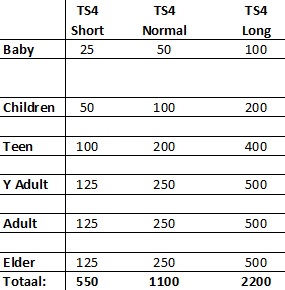
With every sims game every player loves to play with a lifespan most suitable for his/her game. That's why Katiardguez requested this lifespan.
Short divides the lengths in half. Long doubles the lengths.
Requests
I understand that there will be people who would like to see different spans for the different ages as this one.
I wrote a tutorial to help you make your own lifespan: http://bit.ly/TutorialTS4
Lifespan changes
Compatibility
This mod is based on Game Version 1.0.732.20. If you notice any problems, please, let me know.
Conflicts
This mod edits the AgeTuning XML, and will conflict with any other mod that does the same.
There are already some other versions of the AgeTuning XML so remember this!
Download
http://bit.ly/TS4LifeHundredsFile
Update March 26 2015, game version 1.5.139.1020
If your game is updated to the patch that game out on March 26 2015 or above, then you need the updated version.
Install
Unzip the archive and place the .package file in your Electronic Arts/The Sims 4/Mods folder.
Or if you haven't done this yet, do the following first:
1. - Drop the .package in /Mods as usual
2. - Make an empty folder named "unpackedmod" in /Mods
3. - In your resource.cfg, add the line
DirectoryFiles unpackedmod autoupdate
(i.e.: open that file in a text editor and add the line "DirectoryFiles unpackedmod autoupdate" (without quotes) underneath whatever other text it has.)
Thanks to Plasticbox for the instructions
Thanks
If you like this creation, please, press the thanks button and/or leave a comment. Feedback always keeps a creator going for making more new stuff.
Additional Credits
S4PE and Dark Gaia who kindly gave permission to use his mod as a base
I accept requests full time!
If you have a request please go here: bit.ly/p9ymWC
Please, don't upload these creations anywhere. If you want to share them, share by the button Twitter, Facebook,...
Or share this link anywhere: http://bit.ly/fSnciT
Go here for the update: http://s2idownloads.blogspot.com/2017/01/ts4-new-aging-mod-update-some-hundreds.html
Introduction
With every sims game every player loves to play with a lifespan most suitable for his/her game. That's why Katiardguez requested this lifespan.
Short divides the lengths in half. Long doubles the lengths.
Requests
I understand that there will be people who would like to see different spans for the different ages as this one.
I wrote a tutorial to help you make your own lifespan: http://bit.ly/TutorialTS4
Lifespan changes
Compatibility
This mod is based on Game Version 1.0.732.20. If you notice any problems, please, let me know.
Conflicts
This mod edits the AgeTuning XML, and will conflict with any other mod that does the same.
There are already some other versions of the AgeTuning XML so remember this!
Download
http://bit.ly/TS4LifeHundredsFile
Update March 26 2015, game version 1.5.139.1020
If your game is updated to the patch that game out on March 26 2015 or above, then you need the updated version.
Install
Unzip the archive and place the .package file in your Electronic Arts/The Sims 4/Mods folder.
Or if you haven't done this yet, do the following first:
1. - Drop the .package in /Mods as usual
2. - Make an empty folder named "unpackedmod" in /Mods
3. - In your resource.cfg, add the line
DirectoryFiles unpackedmod autoupdate
(i.e.: open that file in a text editor and add the line "DirectoryFiles unpackedmod autoupdate" (without quotes) underneath whatever other text it has.)
Thanks to Plasticbox for the instructions
Thanks
If you like this creation, please, press the thanks button and/or leave a comment. Feedback always keeps a creator going for making more new stuff.
Additional Credits
S4PE and Dark Gaia who kindly gave permission to use his mod as a base
I accept requests full time!
If you have a request please go here: bit.ly/p9ymWC
Please, don't upload these creations anywhere. If you want to share them, share by the button Twitter, Facebook,...
Or share this link anywhere: http://bit.ly/fSnciT
Sunday, May 24, 2015
TS4 New Aging Mod: Until 70
This mod will be updated to the Toddler patch on 2017-01-28!
Go here for the update: http://s2idownloads.blogspot.com/2017/01/ts4-new-aging-mod-update-until-70.html
Introduction
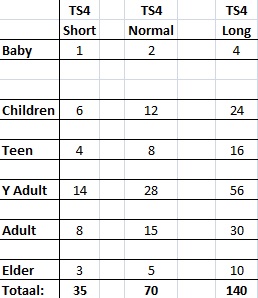
With every sims game every player loves to play with a lifespan most suitable for his/her game. That's why kaichen04 requested this lifespan.
Short divides the lengths in half. Long doubles the lengths.
Requests
I understand that there will be people who would like to see different spans for the different ages as this one.
I wrote a tutorial to help you make your own lifespan: http://bit.ly/TutorialTS4
Lifespan changes
Compatibility
This mod is based on Game Version 1.0.732.20. If you notice any problems, please, let me know.
Conflicts
This mod edits the AgeTuning XML, and will conflict with any other mod that does the same.
There are already some other versions of the AgeTuning XML so remember this!
Download
http://bit.ly/TS4Life70File
Update March 26 2015, game version 1.5.139.1020
If your game is updated to the patch that game out on March 26 2015 or above, then you need the updated version.
Install
Unzip the archive and place the .package file in your Electronic Arts/The Sims 4/Mods folder.
Or if you haven't done this yet, do the following first:
1. - Drop the .package in /Mods as usual
2. - Make an empty folder named "unpackedmod" in /Mods
3. - In your resource.cfg, add the line
DirectoryFiles unpackedmod autoupdate
(i.e.: open that file in a text editor and add the line "DirectoryFiles unpackedmod autoupdate" (without quotes) underneath whatever other text it has.)
Thanks to Plasticbox for the instructions
Thanks
If you like this creation, please, press the thanks button and/or leave a comment. Feedback always keeps a creator going for making more new stuff.
Additional Credits
S4PE and Dark Gaia who kindly gave permission to use his mod as a base
I accept requests full time!
If you have a request please go here: bit.ly/p9ymWC
Please, don't upload these creations anywhere. If you want to share them, share by the button Twitter, Facebook,...
Or share this link anywhere: http://bit.ly/fSnciT
Go here for the update: http://s2idownloads.blogspot.com/2017/01/ts4-new-aging-mod-update-until-70.html
Introduction
With every sims game every player loves to play with a lifespan most suitable for his/her game. That's why kaichen04 requested this lifespan.
Short divides the lengths in half. Long doubles the lengths.
Requests
I understand that there will be people who would like to see different spans for the different ages as this one.
I wrote a tutorial to help you make your own lifespan: http://bit.ly/TutorialTS4
Lifespan changes
Compatibility
This mod is based on Game Version 1.0.732.20. If you notice any problems, please, let me know.
Conflicts
This mod edits the AgeTuning XML, and will conflict with any other mod that does the same.
There are already some other versions of the AgeTuning XML so remember this!
Download
http://bit.ly/TS4Life70File
Update March 26 2015, game version 1.5.139.1020
If your game is updated to the patch that game out on March 26 2015 or above, then you need the updated version.
Install
Unzip the archive and place the .package file in your Electronic Arts/The Sims 4/Mods folder.
Or if you haven't done this yet, do the following first:
1. - Drop the .package in /Mods as usual
2. - Make an empty folder named "unpackedmod" in /Mods
3. - In your resource.cfg, add the line
DirectoryFiles unpackedmod autoupdate
(i.e.: open that file in a text editor and add the line "DirectoryFiles unpackedmod autoupdate" (without quotes) underneath whatever other text it has.)
Thanks to Plasticbox for the instructions
Thanks
If you like this creation, please, press the thanks button and/or leave a comment. Feedback always keeps a creator going for making more new stuff.
Additional Credits
S4PE and Dark Gaia who kindly gave permission to use his mod as a base
I accept requests full time!
If you have a request please go here: bit.ly/p9ymWC
Please, don't upload these creations anywhere. If you want to share them, share by the button Twitter, Facebook,...
Or share this link anywhere: http://bit.ly/fSnciT
Saturday, May 02, 2015
New update: No excel needed to request
Lately some people asked me not to use Excel when requesting. I started to create a spreadsheet in Google Docs so the excelfile can actually be used online.
I accept requests full time!
If you have a request please go here: bit.ly/p9ymWC
Please, don't upload these creations anywhere. If you want to share them, share by the button Twitter, Facebook,...
Or share this link anywhere: http://bit.ly/fSnciT
- You don't need MS Office anymore.
- You don't need to download anything.
- You don't need to send an e-mail with the excelfile.
- You just need to tell me the career title and I will give you the link to your personal Google spreadsheet request.
- Don't worry if you haven't used excel or Google Spreadsheet ever. It's way easier then you think and you'll find instruction on the spreadsheet itself.
I hope this way of working will be the easiest for everybody (Don't worry about me. I download the spreadsheet and that's the same as if you would have sent me the excelfile).
I accept requests full time!
If you have a request please go here: bit.ly/p9ymWC
Please, don't upload these creations anywhere. If you want to share them, share by the button Twitter, Facebook,...
Or share this link anywhere: http://bit.ly/fSnciT
Friday, May 01, 2015
New tutorial: How to use your old laptop as second screen
If you have two working laptops (I have Windows Vista (old) and Windows 8.1 (newer)) then you can use your old laptop as a second screen for your newer one. Your old computer still needs to work correctly.
You only need Teamviewer (free).
Take over your new computer with your old one by using Teamviewer.
Make sure on your new computer that a second screen is in use (you just can't see it).
With Teamviewer on your second computer you can now switch between the first and second screen from the computer you take over.
Indicate the second screen and place it next to your new computer.
Now it looks like you can have a second screen.
It won't be as fast as having a real screen connected to your computer, but if you only use it to view something (like I use it for creating careers (I then need excel and SimPE next to eachother)) it's really helpful!
I accept requests full time!
If you have a request please go here: bit.ly/p9ymWC
Please, don't upload these creations anywhere. If you want to share them, share by the button Twitter, Facebook,...
Or share this link anywhere: http://bit.ly/fSnciT
You only need Teamviewer (free).
Take over your new computer with your old one by using Teamviewer.
Make sure on your new computer that a second screen is in use (you just can't see it).
With Teamviewer on your second computer you can now switch between the first and second screen from the computer you take over.
Indicate the second screen and place it next to your new computer.
Now it looks like you can have a second screen.
It won't be as fast as having a real screen connected to your computer, but if you only use it to view something (like I use it for creating careers (I then need excel and SimPE next to eachother)) it's really helpful!
I accept requests full time!
If you have a request please go here: bit.ly/p9ymWC
Please, don't upload these creations anywhere. If you want to share them, share by the button Twitter, Facebook,...
Or share this link anywhere: http://bit.ly/fSnciT
Thursday, April 30, 2015
New ideas for new careers
There are many new ideas I have for new careers, but I can always use some more. The last time I asked this, I received some ideas (Egyptology and Youtube Career) and I am very happy to say they were created and published.
Now I have some ideas on my to do list:
I really want to create these, but I can always use some inspiration from the people who eventually will use these careers in game.
Please, comment your idea and it might be uploaded before summer!
Now I have some ideas on my to do list:
- Bartender
- Beautician
- Comic Artist
- Dentist
- Event Planner
- Nursing career
- Pharmacist
- Railroad
- Transporter
- Vigilante
- ... and about 60 more
I really want to create these, but I can always use some inspiration from the people who eventually will use these careers in game.
Please, comment your idea and it might be uploaded before summer!
Monday, April 06, 2015
New Update: Lientebollemeis' Policy on creations and requests
Requests for Sims 2 are welcome but for careers and majors only.
I don't create for Sims 3!
You can go here to request:http://bit.ly/dorequest
Only one condition:I accept requests for over 5 years now. I have a certain way of how I work as efficient as possible.
There are also a few things you need to know:
- The creations I made are mostly uploaded on MTS. So respect MTS's guidelines when requesting.
- I have a quite busy life outside Sims, but there's no way I just ignore your message (except requests for Sims 3. I'm tired of those. I just can't create careers for Sims 3).
I'll always answer whether negative or positive. Just try again when I don't answer within two days or so.
- There are many ways to contact someone: thread comment, PM, e-mail, blogpost, Twitter, Facebook,...
The most chance I will remember your request: contact me by e-mail
I create other stuff too (see profile/my blog), but I won't do that by request anymore.
You can always PM me with an idea for something new, but I decide if and when I create it.
General Policy:
1. Only share the link to my work. Don't upload my creations anywhere!
2. Don't modify my work without permission. Just send me a PM.
3. Do NOT use my creations as a base to make edits and reupload, anywhere.
4. When using my work in your pictures, please, give credit (name and link) so people know where to download it.
5. Respect my ideas. Please, don't copy my ideas for your own projects and claim it as your own. Give credit!
Download all creations at once
I have made many many things for The Sims and not everything is available on MTS.
You can find an overview of all creations ever made and where to download them here:http://bit.ly/allcreations
(If there is no downloadlink, that means it's still on my to do list.)
http://bit.ly/allcreations
These are the categories:
- The Sims 4 Creations
- The Sims 3 Creations
- Food
- Projects (Realistic ages multiple choices)
- Mods
- Careers & Majors
- Remakes (The Sims 1, 3 and 4 careers for Sims 2)
- Bedding
- Bodyshop (including clothing, juwelry, hair, ....)
- Lots
- Objects
- Other
- All creations (everything together)
I don't create for Sims 3!
You can go here to request:
Only one condition:I accept requests for over 5 years now. I have a certain way of how I work as efficient as possible.
If you don't respect that way of working, I won't do the request.
There are also a few things you need to know:
- The creations I made are mostly uploaded on MTS. So respect MTS's guidelines when requesting.
- I have a quite busy life outside Sims, but there's no way I just ignore your message (except requests for Sims 3. I'm tired of those. I just can't create careers for Sims 3).
I'll always answer whether negative or positive. Just try again when I don't answer within two days or so.
- There are many ways to contact someone: thread comment, PM, e-mail, blogpost, Twitter, Facebook,...
The most chance I will remember your request: contact me by e-mail
I create other stuff too (see profile/my blog), but I won't do that by request anymore.
You can always PM me with an idea for something new, but I decide if and when I create it.
General Policy:
1. Only share the link to my work. Don't upload my creations anywhere!
2. Don't modify my work without permission. Just send me a PM.
3. Do NOT use my creations as a base to make edits and reupload, anywhere.
4. When using my work in your pictures, please, give credit (name and link) so people know where to download it.
5. Respect my ideas. Please, don't copy my ideas for your own projects and claim it as your own. Give credit!
Download all creations at once
I have made many many things for The Sims and not everything is available on MTS.
You can find an overview of all creations ever made and where to download them here:
(If there is no downloadlink, that means it's still on my to do list.)
These are the categories:
- The Sims 4 Creations
- The Sims 3 Creations
- Food
- Projects (Realistic ages multiple choices)
- Mods
- Careers & Majors
- Remakes (The Sims 1, 3 and 4 careers for Sims 2)
- Bedding
- Bodyshop (including clothing, juwelry, hair, ....)
- Lots
- Objects
- Other
- All creations (everything together)
Sunday, March 29, 2015
New Update: TS4 aging mods
Due to the patch of March 26, 2015 (game version 1.5.139.1020) a lot of mods don't work anymore.
An overview of not working mods is found here: http://modthesims.info/showthread.php?t=551495
Some issues will be fixed by EA Games with a new patch.
I already updated my aging mods. There are now two versions:
If you have a request please go here: bit.ly/p9ymWC
Please, don't upload these creations anywhere. If you want to share them, share by the button Twitter, Facebook,...
Or share this link anywhere: http://bit.ly/fSnciT
An overview of not working mods is found here: http://modthesims.info/showthread.php?t=551495
Some issues will be fixed by EA Games with a new patch.
I already updated my aging mods. There are now two versions:
- One to use if you haven't updated your game to version 1.5.139.1020 or above
- One to use if you have updated your game to version 1.5.139.1020 or above
If you have a request please go here: bit.ly/p9ymWC
Please, don't upload these creations anywhere. If you want to share them, share by the button Twitter, Facebook,...
Or share this link anywhere: http://bit.ly/fSnciT
Monday, March 23, 2015
TS4 New Calendar: Set of 12 Calendars 2015
This is a set of 12 calendars for 2015.
In the game The Sims 2 it's possible to have a calendar that can be changed every month.
Unfortunatly that's not possible in Sims 4 unless you change it manually every day, but that's a bit too much.
That's why I made a year calendar in 12 different recolors for The Sims 4. You hang it on the wall once for a whole year!
These are the same topics as for my calendars of The Sims 2.
Topics
Charmed
Friends
Harry Potter
Twilight
The Hunger Games
Winnie The Pooh
Michael Jackson
Lady Gaga
Pokemon
Justin Bieber
South Park
The Beatles
Some info
It's just one package (recolored from The Intrepid) with 12 swatches. I used several tutorials from Sims 4 Studio (see credits below) to create these.
You can find it in decorative -> Wall Hanings or just search for The Intrepid.
It costs $360 for a calendar.
Screenshots


Download
S2I: http://bit.ly/TS4Calendars2015
Additional Credits:
MS Office
Sims 4 Studio and their tutorials:
http://sims-studio.proboards.com/thread/402/merge-packages-using-sims-studio
http://sims-studio.proboards.com/thread/328/merge-multiple-object-recolors-catalog
If you have a request, please go here: bit.ly/p9ymWC
Please, don't upload these creations anywhere. If you want to share them, share by the button Twitter, Facebook,...
Or share this link anywhere: http://bit.ly/fSnciT
In the game The Sims 2 it's possible to have a calendar that can be changed every month.
Unfortunatly that's not possible in Sims 4 unless you change it manually every day, but that's a bit too much.
That's why I made a year calendar in 12 different recolors for The Sims 4. You hang it on the wall once for a whole year!
These are the same topics as for my calendars of The Sims 2.
Topics
Charmed
Friends
Harry Potter
Twilight
The Hunger Games
Winnie The Pooh
Michael Jackson
Lady Gaga
Pokemon
Justin Bieber
South Park
The Beatles
Some info
It's just one package (recolored from The Intrepid) with 12 swatches. I used several tutorials from Sims 4 Studio (see credits below) to create these.
You can find it in decorative -> Wall Hanings or just search for The Intrepid.
It costs $360 for a calendar.
Screenshots
Download
S2I: http://bit.ly/TS4Calendars2015
Additional Credits:
MS Office
Sims 4 Studio and their tutorials:
If you have a request, please go here: bit.ly/p9ymWC
Please, don't upload these creations anywhere. If you want to share them, share by the button Twitter, Facebook,...
Or share this link anywhere: http://bit.ly/fSnciT
Sunday, March 22, 2015
New tutorial: Translate a career in the language you want
Update: 2020-04-12
Here's an explanation of how you can translate one of my careers in the language you want. If you follow this way, it's 5 minutes work to upload it.
How to translate?
1. Is the career already translated into the language you want, because then your hard work would be in vain? Check it here: http://bit.ly/PS89j8
2. It's important that you just translate the English lines. (See the thread to know which descriptions and which levels belong together)
The translationfiles are included in every upload. If not let me know (PM on Facebookpage)
3. You have to translate it twice. Once for male and once for female. Even when it's the same description!
---- Please, don't change the other lines. Then the file won't work.
4. Don't forget to translate the word "Unemployed" and to give me the translation of the career title as I will need that info when I add your translation to the career.
5. Send me a PM on my Facebookpage and there you can send me the textfile
---- In the PM, please, mention the following:
------- Career title in English and the translation (in the language you want)
------- Name the translated textfile: "LanguageTitleCareerByNickname"
----------- E.g.: DutchACAuthorByLientebollemeiS2I
IMPORTANT
I don't speak many languages so I can't help you with getting special characters to work in game. I just import the translationfile you send and upload it.
If you have any questions, please, ask me on my Facebookpage in a PM (you can do that in the Contact Me section on the left side of this page)
Here's an explanation of how you can translate one of my careers in the language you want. If you follow this way, it's 5 minutes work to upload it.
How to translate?
1. Is the career already translated into the language you want, because then your hard work would be in vain? Check it here: http://bit.ly/PS89j8
2. It's important that you just translate the English lines. (See the thread to know which descriptions and which levels belong together)
The translationfiles are included in every upload. If not let me know (PM on Facebookpage)
3. You have to translate it twice. Once for male and once for female. Even when it's the same description!
---- Please, don't change the other lines. Then the file won't work.
4. Don't forget to translate the word "Unemployed" and to give me the translation of the career title as I will need that info when I add your translation to the career.
5. Send me a PM on my Facebookpage and there you can send me the textfile
---- In the PM, please, mention the following:
------- Career title in English and the translation (in the language you want)
------- Name the translated textfile: "LanguageTitleCareerByNickname"
----------- E.g.: DutchACAuthorByLientebollemeiS2I
IMPORTANT
I don't speak many languages so I can't help you with getting special characters to work in game. I just import the translationfile you send and upload it.
If you have any questions, please, ask me on my Facebookpage in a PM (you can do that in the Contact Me section on the left side of this page)
Saturday, February 14, 2015
New update: Download all creations at once
This weekend I have been busy with updating the page "Download all creations". These are the most important updates:
I accept requests full time!
If you have a request please go here: bit.ly/p9ymWC
Please, don't upload these creations anywhere. If you want to share them, share by the button Twitter, Facebook,...
Or share this link anywhere: http://bit.ly/fSnciT
- Food: There are now 15 more sub sandwiches available not uploaded anywhere yet. Only available when downloading all at once.
- Sims 4 Creations: is a new tab I added to the overview. You can now view there all the Sims 4 creations I ever made.
- Careers & majors: Many new careers and majors added.
- Mods: I decided something about the lifespans. I still want to create spans by request, but I'm not going to upload them anymore. They're only for personal use when I create them for you. It's just to hard to indicate the difference and very confusing with all that variaty.
- All creations: This tab has been updated to.
I accept requests full time!
If you have a request please go here: bit.ly/p9ymWC
Please, don't upload these creations anywhere. If you want to share them, share by the button Twitter, Facebook,...
Or share this link anywhere: http://bit.ly/fSnciT
Saturday, January 17, 2015
New tutorial: How to create a new book
If you have any problems, don't hesitate to ask! You can PM me on Facebook
In this tutorial I will explain how to create a new book by cloning an existing mesh so you can buy it from the catalog. You'll also learn how to recolor that cloned book. This is usefull for example if you create a Twilight book and then recolor it for the sequels (Now don't create twilight books, because I've already done that. It's just an example.)
I'm going to use the Twilight books in this tutorial. So you can see what I mean.
What you will need (see how to get it below):
SimPE
A mesh of a book (or another object)
A paint program you can easily work with (this is a SimPE tutorial, I suppose that you already now how to change the image)
DDS Utility: Download + how to install in SimPE: http://sims2designs.co.uk/dds_utilities_tutorial/index.html
Let's get started
First you need to download SimPE here: http://sims.ambertation.de/
You need to download version SimPE 0.73.44 QA for everyone (April 11th,2009)
You also need to download an existing book. The policy of Nate94288 is very generous: http://www.modthesims.info/member.php?u=1185189
Feel free to use anything I've created in anything. All I request is you let them know you got it from me.
So you need to download his book Harry Potter: http://www.modthesims.info/download.php?t=240935
You can choose which of the 14 meshes you will use. You only need one!
Open SimPE
- At the bottom you see several tabs.
- Go to the tab Object Workshop
- Press the button Open...
- And open the downloaded mesh
- At the right you see in orange Set Defaults
- Press that text to be sure defaults are set
- You see you can choose on the left under Task Clone or Recolor
- It's the first book we make so choose Clone
- Then press start.
- You need to type the following things:
- A title (Twilight)
- Add a price for your book
- And add a description (about Twilight)
- When you're done, press Finish
- When the package has been made you'll see Scenegraph rename wizard
- ps-[Lientebollemeis-17.1.2015-113b1e]
- Change it into something like this: Twilight-[Lientebollemeis-17.1.2015-113b1e]
- Press update
- Then press Ok
- A Save As window will open.
- Give your package a name
- E.g.: MeshTwilight-S2I-20150117
- Now your package (new mesh) has been made, but you're not done yet!
Create your book
Go to the tab Plugin view
- At the left you see Resource tree
- Go to Object Data
- The name is still Harry Potter ...
- Press that name
- In the Plugin view screen you see several fields we need to change.
- First change Filename into the name of your book (Twilight)
- Then press Get GUID It's very important to give each object you make a unique GUID. The game can only show one object with the same GUID. So if your object has the same GUID as mine, they will overwrite eachother.
- After a few seconds a screen will open. Register new user if you don't have a GUID block yet.
- Then press Register object
- The window will close and then press commit in the Plugin view
In Object Data Editor you can also change the Catalog sort if you want to.
- Look at the Resource tree again and find (and press) Pie menu strings
- Scroll down and press the text Read Harry Potter...
- Now you can change that text into Read Twilight
- Don't forget to press Commit File on the right or you changes will not be saved.
- Now scroll down further in Resource tree
- And press Texture image
- In Resource List you find 5 of 6 images that need to be changed. (They all start with "cover")
- You see that all the 5 images are the same so you only need to change it once.
- You'll also see that both front and back cover of the book are mirrored.
- Press one file in Resource list (with "cover" in the name)
- Hover above the image and press the right mouse button
- Press Export and save the file.
- Open the file in a paint program and edit it to your wishes.
Changing the image
- Go back to SimPE and press the right mouse button on the image you need to change.
- Press Build DXT
- A window will open DDS Builder
- Open the image you have just made
- Change the format into DXT3Format
- Change sharpen into none
- Press Build
- Press with your right mouse button on the (new) image again and select Update all Sizes
- Do this for all the images you need to change (with "cover" in the name)
- Don't forget to press "Commit" every time!
Save your package and try it out in game!
If something went wrong, don't hesitate to ask! I'd love to help you and it will also help me to make the tutorial better!
To recolor
- Follow the the instructions of Open SimPE again, but instead of Clone select Recolor
- Then follow the instructions of Changing the image (Press Texture image)
- Do this for as many recolors as you want. (In Twilight's case 3 times as there are 4 books)
- If you have any problems, let me know.
"I'm so proud of what I just made that I want to upload it. Can I?"
Only if you follow these terms:
- Only upload on this blog or on MTS.
- Not ever on a paysite (even if it has a free section) or to the exchange!
- Credit Nate94288 with a link back to his MTS profile: http://www.modthesims.info/member.php?u=1185189
- Credit me (LientebollemeiS2I) and this blog http://bit.ly/fSnciT for the tutorial so others can learn how to create their own book.
If you have any questions about this policy, ask first!
I accept requests full time!
If you have a request please go here: bit.ly/p9ymWC
Please, don't upload these creations anywhere. If you want to share them, share by the button Twitter, Facebook,...
Or share this link anywhere: http://bit.ly/fSnciT
Sunday, November 09, 2014
TS4 New tutorial: Create a new lifespan for Sims 4
I don't support the lifespanmods for TS4 anymore.
But with this tutorial you can update it yourself:
Just be sure you use an update lifespan mod as a base:
http://modthesims.info/download.php?t=552222
or
http://modthesims.info/download.php?t=590549
The reason why I don't support them anymore, is because nearly every time there's a new patch, update, game pack or EP there's a huge chance this needs to be updated (so have fun with that).
I hardly play the game myself anymore and if I play it's totally without CC 'cause nearly every time there's a new patch, update, game pack or EP there's a huge chance +50% of my CC needs to be updated.
The principle of this tutorial still is the same after the toddler patch and after the Cats & Dogs EP. You just need to change the age for toddlers and pets as well.
But with this tutorial you can update it yourself:
Just be sure you use an update lifespan mod as a base:
http://modthesims.info/download.php?t=552222
or
http://modthesims.info/download.php?t=590549
The reason why I don't support them anymore, is because nearly every time there's a new patch, update, game pack or EP there's a huge chance this needs to be updated (so have fun with that).
I hardly play the game myself anymore and if I play it's totally without CC 'cause nearly every time there's a new patch, update, game pack or EP there's a huge chance +50% of my CC needs to be updated.
The principle of this tutorial still is the same after the toddler patch and after the Cats & Dogs EP. You just need to change the age for toddlers and pets as well.
Things needed before you start:
- S4PE: download here: http://bit.ly/downloads4pe
- IMPORTANT: unzip with 7zip not Winrar
- An already working custom lifespan package.
- Download here if your game has a lower version than 1.5.139.1020: http://bit.ly/AgeTutorial
- Download here if your game has version 1.5.139.1020 or higher: http://bit.ly/AgeTutorialUpdate
- Download here if your game is updated to the Toddler patch or higher: http://bit.ly/AgeTutorialUpdateToddlers
Make sure you use an updated custom lifespan package as base.
Creating the lifespan
- Open S4PE.
- Open the lifespan package.
- The screen is divided into two windows.
- In the left window you will see one line.
- Select that line and you will see text in the right window
- Then go to Settings and then External programs


- Be sure none of the squares are selected.
- Press "ok"
- Press with the right-mouse button on the line in the left window.
- Select Notepad at the buttom of the menu
- The notepadfile will open.
- Press ctrl + F and type "threshold"
- The notepad will search for all the lines with that word.
- On the right of that word you see a number.
- That's the span of the age you see a few lines higher
- The value is always the "Normal" length

- Change the values in the ones you want for the Normal length for all the ages.
- At the top of the notepadfile you will see the multipliers for the other lengths.
- In this example the span of the adult age for the length "Fast" will be 408*2=816
- The span of the adult age for the length "Slow" will be 408*0.5=204

- Save the notepadfile and close it.
- Say Yes when S4PE askes Commit changes?
- Now go to File and press Save as
- Give the package a unique name and save it in the mods folder of your game
- Be sure you only have one lifespan mod in that folder at the time.
If you have any questions, don't hesitate to comment. I'll answer asap.
Policy on uploading
- If you want to upload your new created lifespan made with this tutorial, please, respect my general policy: http://bit.ly/PolicyS2I
- Please, give credit with a link back to this tutorial http://bit.ly/TutorialTS4 when uploading so other people can use the tutorial too.
- This policy only counts for this tutorial. For my general policy go here: http://bit.ly/PolicyS2I
I accept requests full time!
If you have a request please go here: bit.ly/p9ymWC
Please, don't upload these creations anywhere. If you want to share them, share by the button Twitter, Facebook,...
Or share this link anywhere: http://bit.ly/fSnciT
Sunday, November 02, 2014
New tutorial: Post to the blog S2I
The old tutorial about posting to this blog S2I has been deleted. It might have been a bit too complicated to easily post to the blog. So I decided to make it way easier for you to post on this blog yourself.
Tutorial:
Mail the text, creations, images,... you want to publish on the blog to these 2 addresses:
The post will be published within 48 hours.
Tuesday, September 23, 2014
New book: Book of Shadows Large
This is the book of shadows from the magical series Charmed.
It's larger than a normal sim book so the animation is not perfect. I used a picture of the demon Belthazor for the book.
The cover is exactly the same as the book in the series.
I hope you like it!
It's larger than a normal sim book so the animation is not perfect. I used a picture of the demon Belthazor for the book.
The cover is exactly the same as the book in the series.
I hope you like it!
Screenshot:

Download:
SFS: http://simfileshare.net/folder/84038/
Buy Mode - Hobbies
Credits:
The mesh is made by me. Please, respect my policy.
Policy:
https://s2idownloads.blogspot.com/p/about-lientebollemeis.html
Please, don't upload these creations anywhere. If you want to share them, share by the button Twitter, Facebook,...
Or share this link anywhere: http://bit.ly/fSnciT
Tuesday, May 06, 2014
New babyoutfit: 216 Baby Disney Mickey & Winnie & Co
On my blog you can already download clothes for YA and Adult females, but these are for babies.
Normally a baby has one outfit and the same one for every new born. (You can have default replacements but still all babies wear the same outfit.)
With this every baby can have a different outfit and you can change it as much as you like.
I chose Baby Disney as it is for babies and I chose the most common, known and popular cartoons namely: Mickey, Minnie, Donald, Daisy, Pluto, Goofy, Group (4 of them together), Winnie the Pooh, Tigger, Piglet, Eeyore and all of them together.
There are 18 different colors of the outfit. So 12 cartoons * 18 different colors = 216 new babyoutfits non-default replacement.
I'm not a huge fan of babies in the Sims 2. They can't do anything and the sims cannot do much with them. It's a lifestage that I always hope to go by quickly. But now they can have different outfits every day. Althoug I think 216 days is a lot, I still really like the idea and want to have them with my sims a little longer now.
Screenshot:

REQUIRED
Mesh
This is actually a recolor of the mesh made by Fakepeeps7.
So you need that mesh to make this work: http://bit.ly/OWYsFw
Mod object
You'll need Chris Hatch's mod (http://bit.ly/1dobWoV) to use these clothes (otherwise, they won't show up and your baby will just wear a diaper if you don't have any other defaults installed). All outfits are unisex. The Pets EP or higher is required to use the mod.
Download:
SFS: http://www.simfileshare.net/folder/84038
How to USE Chris Hatch's Plan Baby Mod:
0. Purchase the Buy Baby Outfit teddy bear. There is to my knowledge no other way to buy baby clothes. Yet? Maybe 'yet.'
1. Have your parent Sim either hold their baby or put their baby on the floor. I haven't checked this with every possible combination of relatives, but an unrelated adult CANNOT get new clothes for a baby. Didn't think to check with teenagers. Somebody try it and report back?
2. With your parent Sim selected, click on the teddy bear and select "Buy Outfit For..." which should lead you to the names of all infants ant toddlers in the household. Click on a toddler's name.
3. A standard clothing-purchase window will pop up. DO NOT CLICK ANY AGE ICONS. Click on one of the gender icons instead. That's the only way to get to the baby clothes. Select and purchase baby clothes as you would normal clothes; they only cost $25 each so stock up. Hit the check-mark to buy clothes.
4. When the clothing purchase window closes, a plan outfit window will appear. So... plan your outfit.
5. If you forgot to plan your outfit, panicked and hit Close, or just want to change your baby's casual clothing for the season, buy one of the Maxis changing tables and have a parent Sim Plan Outfit For their baby as they would for a toddler.
All explanation is also found here: http://bit.ly/1dobyHg
FAQ
Can you create something for me? http://bit.ly/p9ymWC
Q&A
If you still have questions, please, use the commentsection. I'm open to questions.
Thanks
If you like this creation, please, press the thanks button and/or leave a comment. Feedback always keeps a creator going for making more new stuff.
My Policy
1. Only share the link to my work. Don't upload my creations anywhere!
2. Don't modify or upload my work without permission. Just send me a PM.
3. When using my work in your pictures, please, give credit (name and link) so people know where to download it.
Additional Credits:
Chris Hatch for the mod!
fakepeeps7 for the mesh and base textures I used to make new textures
Numenor for the Anygamestarter
Photoshop SimPE Bodyshop
Please, don't upload these creations anywhere. If you want to share them, share by the button Twitter, Facebook,...
Or share this link anywhere: http://bit.ly/fSnciT
Saturday, May 03, 2014
New hair: Colored hair for female elders
One of the things I don't like about elders is that they all have grey hair and therefore don't look young while when someone is 65, she can still have colored hair (maybe not naturally but thanks to the hairdresser).
I have searched with Google, but I couldn't find this anywhere.
So I present to you 120 colored hairdo's from the base game for elders.
These are actually 30 different hairs in the 4 different colors. Copied from the adult hair for Base Game.
With this download the elders look like elders, but with a younger touch.


Download:
SFS: http://simfileshare.net/folder/84038/
I have searched with Google, but I couldn't find this anywhere.
So I present to you 120 colored hairdo's from the base game for elders.
These are actually 30 different hairs in the 4 different colors. Copied from the adult hair for Base Game.
With this download the elders look like elders, but with a younger touch.
Download:
SFS: http://simfileshare.net/folder/84038/
Body Shop - Hair - Female
Meshes
As this is copied from Base Game you don't need anything. Just the base game is enough.
Overwriting?
These are 120 new files which don't overwrite the existing grey hair. So your elders can still have gray hair too!
- They all have names that should make it clear which file is which haircut. The numbers and letters have been removed from the file.
Thanks
If you like this creation, please, press the thanks button and/or leave a comment. Feedback always keeps a creator going for making more new stuff.
FAQ
Can you create something for me?: http://bit.ly/p9ymWC
If you have more questions, please, use the comment section.
My Policy
1. Only share the link to my work. Don't upload my creations anywhere!
2. Don't modify or upload my work without permission. Just send me a PM.
3. When using my work in your pictures, please, give credit (name and link) so people know where to download it.
Additional Credits:
Numenor for the Anygamestarter
Bodyshop
Wooden UI by Calidan (MTS) http://bit.ly/1aKIKpW
Please, don't upload these creations anywhere. If you want to share them, share by the button Twitter, Facebook,...
Or share this link anywhere: http://bit.ly/fSnciT
Meshes
As this is copied from Base Game you don't need anything. Just the base game is enough.
Overwriting?
These are 120 new files which don't overwrite the existing grey hair. So your elders can still have gray hair too!
- They all have names that should make it clear which file is which haircut. The numbers and letters have been removed from the file.
Thanks
If you like this creation, please, press the thanks button and/or leave a comment. Feedback always keeps a creator going for making more new stuff.
FAQ
Can you create something for me?: http://bit.ly/p9ymWC
If you have more questions, please, use the comment section.
My Policy
1. Only share the link to my work. Don't upload my creations anywhere!
2. Don't modify or upload my work without permission. Just send me a PM.
3. When using my work in your pictures, please, give credit (name and link) so people know where to download it.
Additional Credits:
Numenor for the Anygamestarter
Bodyshop
Wooden UI by Calidan (MTS) http://bit.ly/1aKIKpW
Please, don't upload these creations anywhere. If you want to share them, share by the button Twitter, Facebook,...
Or share this link anywhere: http://bit.ly/fSnciT
Tuesday, April 29, 2014
New FAQ: How to have more than one lifespan?
 It's not really that I got this question from downloaders. It's just something I think a lot of people want and never dreamt of it being possible. BUT IT IS!
You just need one word: ANYGAMESTARTER (by Numenor)
Those who know what this anygamestarter is, don't need to read further. I think you know what I'm talking about and that you know it is indeed possible.
If you don't know what the anygamestarter is, read this first: http://bit.ly/1mVcs1l
First of all, I didn't say it is possible to have more than one lifespan at once, so in one downloadfolder. Because that's not possible. The game loads one downloadfolder and can only load one lifespan. So sorry to say it's not possible to have a different lifespan in a different household in the same neighbourhood.
As you may have read, in the thread Numenor made, you can make several Anygames or permanent games. So you have The Sims 2 more than once.
Every anygame/permanent game has a different folder in My Documents. So go the folder of the new anygame/permanent game and create a new downloadfolder there like you needed to do in the folder EA Games/The Sims 2 to make downloads work the first time you started downloading.
Put a different lifespan in the new downloadfolder and start the Anygame/permanent game. Now you have a different lifespan than your default The Sims 2 game. So you can play with more than one lifespan.
If you don't want to download the Anygamestarter, here is another hint: You can have more than one account on a computer (maybe there already is one for you, your sibling, parents,...) and that's a different game for every account. So if you put another lifespan in the downloadfolder of another game, you can have more than one lifespan.
I hope this explanation was a bit clear to everyone. If you have any questions, don't hesitate to comment!
Saturday, March 29, 2014
New babyoutfit: Uniform Star Trek Voyager
 This time I tried something completly new to me.
On my blog you can already download clothes for YA and Adult females, but these are for babies.
Normally a baby has one outfit and the same one for every new born. (You can have default replacements but still all babies wear the same outfit.)
With this every baby can have a different outfit and you can change it as much as you like.
I chose Star Trek Voyager cause for the last couple of months I watched that series again and I really love the idea of babies wearing that uniform too.
I hope all you Star Trek fans like it.
For me personally this is Unmissable CC.
REQUIRED
Mesh
This is actually a recolor of the mesh made by Fakepeeps7.
So you need that mesh to make this work: http://bit.ly/OWYsFw
Mod object
You'll need Chris Hatch's mod (http://bit.ly/1dobWoV) to use these clothes (otherwise, they won't show up and your baby will just wear a diaper if you don't have any other defaults installed). All outfits are unisex. The Pets EP or higher is required to use the mod.
Screenshot:

How to USE Chris Hatch's Plan Baby Mod:
0. Purchase the Buy Baby Outfit teddy bear. There is to my knowledge no other way to buy baby clothes. Yet? Maybe 'yet.'
1. Have your parent Sim either hold their baby or put their baby on the floor. I haven't checked this with every possible combination of relatives, but an unrelated adult CANNOT get new clothes for a baby. Didn't think to check with teenagers. Somebody try it and report back?
2. With your parent Sim selected, click on the teddy bear and select "Buy Outfit For..." which should lead you to the names of all infants ant toddlers in the household. Click on a toddler's name.
3. A standard clothing-purchase window will pop up. DO NOT CLICK ANY AGE ICONS. Click on one of the gender icons instead. That's the only way to get to the baby clothes. Select and purchase baby clothes as you would normal clothes; they only cost $25 each so stock up. Hit the check-mark to buy clothes.
4. When the clothing purchase window closes, a plan outfit window will appear. So... plan your outfit.
5. If you forgot to plan your outfit, panicked and hit Close, or just want to change your baby's casual clothing for the season, buy one of the Maxis changing tables and have a parent Sim Plan Outfit For their baby as they would for a toddler.
All explanation is also found here: http://bit.ly/1dobyHg
Download:
http://simfileshare.net/folder/84038/
Sims 2 Idea > Body Shop > Baby
FAQ
Can you create something for me? http://bit.ly/p9ymWC
Q&A
If you still have questions, please, use the commentsection. I'm open to questions.
Thanks
If you like this creation, please, press the thanks button and/or leave a comment. Feedback always keeps a creator going for making more new stuff.
My Policy
1. Only share the link to my work. Don't upload my creations anywhere.
2. Don't modify or upload my work without permission. Just contact me.
3. When using my work in your pictures, please, give credit (name and link) so people know where to download it.
Additional Credits:
Chris Hatch for the mod!
fakepeeps7 for the mesh and base textures I used to make new textures
Numenor for the Anygamestarter
Photoshop SimPE Bodyshop
Please, don't upload these creations anywhere.
Share this by clicking the button below.
FAQ
Can you create something for me? http://bit.ly/p9ymWC
Q&A
If you still have questions, please, use the commentsection. I'm open to questions.
Thanks
If you like this creation, please, press the thanks button and/or leave a comment. Feedback always keeps a creator going for making more new stuff.
My Policy
1. Only share the link to my work. Don't upload my creations anywhere.
2. Don't modify or upload my work without permission. Just contact me.
3. When using my work in your pictures, please, give credit (name and link) so people know where to download it.
Additional Credits:
Chris Hatch for the mod!
fakepeeps7 for the mesh and base textures I used to make new textures
Numenor for the Anygamestarter
Photoshop SimPE Bodyshop
Please, don't upload these creations anywhere.
Share this by clicking the button below.
Like the Facebookpage of Sims 2 Idea for not missing out on anything.
Tuesday, March 11, 2014
New Family Tree: Pedigree 1
 This is a new Family Tree I made up myself. It's one of a series of 8. I'll call the collection Pedigree which means Family Tree.
I hope you enjoy this one.
They can all be found here: Label: Family Tree

- Female & Male
- Male
- Female & Male
- Female
- Male & Female
- Female
- Male
- Female
- Male
- Female
- Female
- Male & Female
- Female & Male
- Male
- Male
- Male
- Male & Female
- Female
- Female
- Male & Female
- Male
- Male
- Male
- Female
I hope it's clear to everyone how to make this family tree.
If you have any questions, please, use the commentsection. Thank you.
I accept requests full time!
If you have a request please go here: bit.ly/p9ymWC
Please, don't upload these creations anywhere. If you want to share them, share by the button Twitter, Facebook,...
Or share this link anywhere: http://bit.ly/fSnciT
Saturday, March 08, 2014
New FAQ: What is PTO?
By default it takes a sim 7 working days before getting 1 day of paid vacation (PTO).
There is now a global mod for PTO3 and PTO5.
Click here to download the global mod for PTO3 or PTO5.
You don't need to redownload the career if you already had a PTO version I made before.
Don't hesitate to contact me when needed (sidebar on this blog).
If you have any questions, don't hesitate to ask (e.g.: in the commentsection). It might help other players too.
Please, don't upload these creations anywhere. If you want to share them, share by the button Twitter, Facebook,...
Or share this link anywhere: http://bit.ly/fSnciT
New announcement: PTO - careers + updates
 In the last few weeks I worked on the updates of the careers I made so far (about 200). I update the icon so it doesn't look weird when using another UI like the wooden one from Calidan you can see in the new screenshots I made. I want all the screenshots to be simular so I will update them too.
Then I also made some new versions of the existing careers. By default it takes a sim 7 working days before getting 1 day of paid vacation (PTO). I made a version to let it take 3 days (PTO3) and one where it takes 5 days (PTO5) before getting one day paid vacation.
On my blog you can find the careers that were updated with PTO by pressing the label "Career - PTO" or by looking in the overview of all creations I ever made (http://bit.ly/1jEmkLT). When there is an "X" in the column "PTO", the career was updated on all sites where the career is available.Let me know what you think of this PTO idea so all those hours of hard work were not in vain for me.
The first one of those careers is now available on MTS and on this blog: Legendary Rockstar
Overview: http://bit.ly/1jEmkLT - Career - Legendary Rockstar
I will also make photoalbums (and some video's (fashion shows) of the clothes I made) of all the creations I ever made. Then it might be easier to follow new creations. But that will take some time. I would like to finish the other things on my to do list first.
Subscribe to:
Posts (Atom)