In general the idea is to give you one episode per blogpost. In every blogpost I'll shortly describe what happens with the six main characters of Friends in that certain episode. SPOILER
You can then play this in the game as you wish.
The blogpost about the personality, family tree,... of the six main characters in general is found here: http://bit.ly/FriendsGeneralMain
General happenings season 2:
The second season begins with Rachel waiting at the gate for Ross to declare her love for him. However, she discovers that he is dating Julie (Lauren Tom), someone he knew from graduate school. Rachel's attempts to tell Ross she likes him mirror his failed attempts in the first season, although the characters eventually begin a relationship. Joey gets cast in a part in a fictional version of the soap opera Days of Our Lives, but his character is killed off after conflicts with the show's writers, claiming that he writes many of his own lines. Chandler gets back with Janice, his ex-girlfriend from season one. Monica begins dating Richard (Tom Selleck), a recently divorced family friend and 21 years her senior. In the season finale, they end their relationship when they realize that unlike Monica, Richard does not want children.
The One Where Heckles Dies - S2E03
Chandler breaks up with a woman because her nostrils are too big--yet another superficial reason to avoid a real relationship. Mr. Heckles complains again about the noise--it's disturbing his birds (he could have birds). Phoebe, Rachel, and Joey impersonate Janice. Mr. Heckles dies, apparently while hitting his ceiling with a broom because of the noise from above. Phoebe doesn't believe in evolution, which bothers Ross enough that he feels he has to convince her of the theory. Rachel and Monica inherit all of Mr. Heckles earthly possesions; while clearing out his apartment, they discover that Heckles was quite a funny guy in his time. Chandler is upset to find how much he has in common with Mr. Heckles, and in his determination not to die alone, he calls Janice... only to find out that she's married and pregnant. While trying to decide which of Heckles' things to keep, Rachel realizes that Monica doesn't consider the apartment to be "their" apartment.
Joey: He dated a girl with the biggest adamsapple when he first came to the city.
Chandler: He dumps a girl Joan, because of the big nostril thing. He finds out that Mr. Heckles was like him as a young man and now he is scared to end up alone. He played clarinet and was in a club model building. He calls Janice, but she's pregnant now. The girls try to comfort him by talking about their bad relationships. At the end he dates Allison from work with an unusual big head who studied philosophy.
(Maureen Rosila doesn't hate Yanni (not a good reason to dump her).
Ross: He's busy trying to convince Phoebe evolution is a scientific fact, but he gives in at the end.
Rachel: When she comforts Chandler she tells about a guy dumping her because his cat didn't like her.
Monica: Teddy in high school dumped Monica because she was too fat/ busy with school play.
Phoebe: She doesn't believe in evolution. Ross tries to convince her otherwise.
A guy dumped her because she fell asleep during spinal tap.
Credits:
http://www.friends-tv.org/
Tuesday, November 22, 2016

Monday, November 21, 2016
New idea: Friends - The One With the Breast Milk - S2E2
In general the idea is to give you one episode per blogpost. In every blogpost I'll shortly describe what happens with the six main characters of Friends in that certain episode. SPOILER
You can then play this in the game as you wish.
The blogpost about the personality, family tree,... of the six main characters in general is found here: http://bit.ly/FriendsGeneralMain
General happenings season 2:
The second season begins with Rachel waiting at the gate for Ross to declare her love for him. However, she discovers that he is dating Julie (Lauren Tom), someone he knew from graduate school. Rachel's attempts to tell Ross she likes him mirror his failed attempts in the first season, although the characters eventually begin a relationship. Joey gets cast in a part in a fictional version of the soap opera Days of Our Lives, but his character is killed off after conflicts with the show's writers, claiming that he writes many of his own lines. Chandler gets back with Janice, his ex-girlfriend from season one. Monica begins dating Richard (Tom Selleck), a recently divorced family friend and 21 years her senior. In the season finale, they end their relationship when they realize that unlike Monica, Richard does not want children.
The One With the Breast Milk - S2E02
Carol breastfeeds Ben, causing Joey and Chandler discomfort. However, even stronger reactions occur when Ross is taking care of Ben and Phoebe checks the temperature of the bottled breast milk by tasting it. Julie invites Monica to go shopping; Rachel finds out and feels betrayed. Joey's status as the Bijan Cologne Man is threatened when his department store hires someone to be the Hombre Man. Rachel tries to be nicer to Julie, but is less than sincere.
Joey: He has a job at Saks 5th Avenue. He's selling bijjan for men. And wants to hit on Annabel, a girl co-worker. He gets competition from the hombre man for both parfum and the girl. The guy is so good that Joey has to sell hombre too. But the other guys sprays in the eyes of a client by accident and Joey wins Annabel.
Chandler: Carol is feeding Ben and Joey and Chandler are uncomfortable.
Ross: Ross takes care of Ben for a night. He freaks out about the breast milk and doens't want to taste it until Susan says it tastes like cantaloupe juice.
Rachel: Rachel is annoyed that Julie is so good and friendly. She finds out about Julie and Monica because Monica says she went to lunch alone but she has a receipt for two.
She then tries to be friends with Julie after talking to Monica. But it can't work.
Monica: Monica goes to Bloomingdales with Julie. It's like cheating Rachel in her house of worship.
Monica asks Phoebe to say to Rachel that they went shopping.
When Julie calls she says "Hi, Jew" It was her friend Eddie Moskowitz.
Phoebe: Phoebe tastes the breast milk and only Joey understands. (Monica isn't there.)
Credits:
http://www.friends-tv.org/
Please, don't upload these creations anywhere. If you want to share them, share by the button Twitter, Facebook,... Or share this link anywhere: http://bit.ly/fSnciT
You can then play this in the game as you wish.
The blogpost about the personality, family tree,... of the six main characters in general is found here: http://bit.ly/FriendsGeneralMain
General happenings season 2:
The second season begins with Rachel waiting at the gate for Ross to declare her love for him. However, she discovers that he is dating Julie (Lauren Tom), someone he knew from graduate school. Rachel's attempts to tell Ross she likes him mirror his failed attempts in the first season, although the characters eventually begin a relationship. Joey gets cast in a part in a fictional version of the soap opera Days of Our Lives, but his character is killed off after conflicts with the show's writers, claiming that he writes many of his own lines. Chandler gets back with Janice, his ex-girlfriend from season one. Monica begins dating Richard (Tom Selleck), a recently divorced family friend and 21 years her senior. In the season finale, they end their relationship when they realize that unlike Monica, Richard does not want children.
The One With the Breast Milk - S2E02
Carol breastfeeds Ben, causing Joey and Chandler discomfort. However, even stronger reactions occur when Ross is taking care of Ben and Phoebe checks the temperature of the bottled breast milk by tasting it. Julie invites Monica to go shopping; Rachel finds out and feels betrayed. Joey's status as the Bijan Cologne Man is threatened when his department store hires someone to be the Hombre Man. Rachel tries to be nicer to Julie, but is less than sincere.
Joey: He has a job at Saks 5th Avenue. He's selling bijjan for men. And wants to hit on Annabel, a girl co-worker. He gets competition from the hombre man for both parfum and the girl. The guy is so good that Joey has to sell hombre too. But the other guys sprays in the eyes of a client by accident and Joey wins Annabel.
Chandler: Carol is feeding Ben and Joey and Chandler are uncomfortable.
Ross: Ross takes care of Ben for a night. He freaks out about the breast milk and doens't want to taste it until Susan says it tastes like cantaloupe juice.
Rachel: Rachel is annoyed that Julie is so good and friendly. She finds out about Julie and Monica because Monica says she went to lunch alone but she has a receipt for two.
She then tries to be friends with Julie after talking to Monica. But it can't work.
Monica: Monica goes to Bloomingdales with Julie. It's like cheating Rachel in her house of worship.
Monica asks Phoebe to say to Rachel that they went shopping.
When Julie calls she says "Hi, Jew" It was her friend Eddie Moskowitz.
Phoebe: Phoebe tastes the breast milk and only Joey understands. (Monica isn't there.)
Credits:
http://www.friends-tv.org/
Please, don't upload these creations anywhere. If you want to share them, share by the button Twitter, Facebook,... Or share this link anywhere: http://bit.ly/fSnciT
Sunday, November 20, 2016
New idea: Friends - The One With Ross's New Girlfriend - S2E1
In general the idea is to give you one episode per blogpost. In every blogpost I'll shortly describe what happens with the six main characters of Friends in that certain episode. SPOILER
You can then play this in the game as you wish.
The blogpost about the personality, family tree,... of the six main characters in general is found here: http://bit.ly/FriendsGeneralMain
General happenings season 2:
The second season begins with Rachel waiting at the gate for Ross to declare her love for him. However, she discovers that he is dating Julie (Lauren Tom), someone he knew from graduate school. Rachel's attempts to tell Ross she likes him mirror his failed attempts in the first season, although the characters eventually begin a relationship. Joey gets cast in a part in a fictional version of the soap opera Days of Our Lives, but his character is killed off after conflicts with the show's writers, claiming that he writes many of his own lines. Chandler gets back with Janice, his ex-girlfriend from season one. Monica begins dating Richard (Tom Selleck), a recently divorced family friend and 21 years her senior. In the season finale, they end their relationship when they realize that unlike Monica, Richard does not want children.
The One With Ross's New Girlfriend - S2E01
Rachel, ready to reveal her feelings to Ross, meets him at the airport; her plans fall apart, however, when she finds out about his new girlfriend, Julie. Chandler, already feeling guilty about revealing Ross's feelings to Rachel, now feels worse that he encouraged Ross to forget about her. The gang watches Sumo Wrestling. Phoebe gives Joey and Chandler haircuts; Monica wants one, too. Phoebe is reluctant because of Monica's picky nature, but finally gives in. Monica wants a cut like Demi Moore; unfortunately Phoebe confuses "Demi" with "Dudley". Chandler needs a suit made, and Joey refers him to the family tailor; while getting measured for pants, Chandler gets a little more attention than he bargained for. Ross sickens everyone (especially Rachel) with his constant gushing for Julie. In Rachel's depression, she sleeps with Paolo again.
Joey: He recommends his tailor rankie to Chandler. He goes there for twelve years and is a bit suprised with what Chandler says after he went.
Chandler: He talks to Ross about Rachel, but Ross wants to move on and doesn't know Rachel knows he is in love with her. He also looks for a tailor. Joey recommends his, but there was definitely cupping. "Joey's tailor, took advantage of me."
Ross: He has a new girlfriend Julie, because he wants to move on from his crush on Rachel. He doesn't know she knows about his crush and likes him back.
Rachel: She is waiting at the airport for Ross but he came from China with Julie. She is mad at Chandler for telling her and blames him for her heartache. So she does something stupid. Paulo is back (but not for long). She talks to Ross about Paolo, but she doesn't tell him what she really wanted to say.
Monica: She wants Phoebe to cut her hair. She wanted Demi Moore, but Phoebe mistook her haircut. The hair doesn't look good.
Phoebe: She dit a haircut for the boys but doesn't want to do Monica. She does in the end but she thought Demi Moore was Dudley Moore.
Credits:
http://www.friends-tv.org/
You can then play this in the game as you wish.
The blogpost about the personality, family tree,... of the six main characters in general is found here: http://bit.ly/FriendsGeneralMain
General happenings season 2:
The second season begins with Rachel waiting at the gate for Ross to declare her love for him. However, she discovers that he is dating Julie (Lauren Tom), someone he knew from graduate school. Rachel's attempts to tell Ross she likes him mirror his failed attempts in the first season, although the characters eventually begin a relationship. Joey gets cast in a part in a fictional version of the soap opera Days of Our Lives, but his character is killed off after conflicts with the show's writers, claiming that he writes many of his own lines. Chandler gets back with Janice, his ex-girlfriend from season one. Monica begins dating Richard (Tom Selleck), a recently divorced family friend and 21 years her senior. In the season finale, they end their relationship when they realize that unlike Monica, Richard does not want children.
The One With Ross's New Girlfriend - S2E01
Rachel, ready to reveal her feelings to Ross, meets him at the airport; her plans fall apart, however, when she finds out about his new girlfriend, Julie. Chandler, already feeling guilty about revealing Ross's feelings to Rachel, now feels worse that he encouraged Ross to forget about her. The gang watches Sumo Wrestling. Phoebe gives Joey and Chandler haircuts; Monica wants one, too. Phoebe is reluctant because of Monica's picky nature, but finally gives in. Monica wants a cut like Demi Moore; unfortunately Phoebe confuses "Demi" with "Dudley". Chandler needs a suit made, and Joey refers him to the family tailor; while getting measured for pants, Chandler gets a little more attention than he bargained for. Ross sickens everyone (especially Rachel) with his constant gushing for Julie. In Rachel's depression, she sleeps with Paolo again.
Joey: He recommends his tailor rankie to Chandler. He goes there for twelve years and is a bit suprised with what Chandler says after he went.
Chandler: He talks to Ross about Rachel, but Ross wants to move on and doesn't know Rachel knows he is in love with her. He also looks for a tailor. Joey recommends his, but there was definitely cupping. "Joey's tailor, took advantage of me."
Ross: He has a new girlfriend Julie, because he wants to move on from his crush on Rachel. He doesn't know she knows about his crush and likes him back.
Rachel: She is waiting at the airport for Ross but he came from China with Julie. She is mad at Chandler for telling her and blames him for her heartache. So she does something stupid. Paulo is back (but not for long). She talks to Ross about Paolo, but she doesn't tell him what she really wanted to say.
Monica: She wants Phoebe to cut her hair. She wanted Demi Moore, but Phoebe mistook her haircut. The hair doesn't look good.
Phoebe: She dit a haircut for the boys but doesn't want to do Monica. She does in the end but she thought Demi Moore was Dudley Moore.
Credits:
http://www.friends-tv.org/
Friday, November 18, 2016
New clothing: Short Dress Boots - Wavy Buttercup 2016
This is a dress made for Young Adult Females and Adult Female sims.
This is a recolor from the Short Dress Boots of the Base Game.
The color is a palette made by me at www.colourlovers.com and is named Buttercup 2016 as it is one of the trendy colors of 2016.
The pattern is also found at www.colourlovers.com and is named Wavy.
Screenshot:

This is a recolor from the Short Dress Boots of the Base Game.
The color is a palette made by me at www.colourlovers.com and is named Buttercup 2016 as it is one of the trendy colors of 2016.
The pattern is also found at www.colourlovers.com and is named Wavy.
Screenshot:

Download:
Credit:
Thursday, November 17, 2016
New clothing: Short Dress Boots - Wavy Rose Quartz 2016
This is a dress made for Young Adult Females and Adult Female sims.
This is a recolor from the Short Dress Boots of the Base Game.
The color is a palette made by me at www.colourlovers.com and is named Rose Quartz 2016 as it is one of the trendy colors of 2016.
The pattern is also found at www.colourlovers.com and is named Wavy.
Screenshot:

This is a recolor from the Short Dress Boots of the Base Game.
The color is a palette made by me at www.colourlovers.com and is named Rose Quartz 2016 as it is one of the trendy colors of 2016.
The pattern is also found at www.colourlovers.com and is named Wavy.
Screenshot:

Download:
Credit:
Tuesday, November 15, 2016
New clothing: Short Dress Boots - Wavy Snorkel Blue 2016
This is a dress made for Young Adult Females and Adult Female sims.
This is a recolor from the Short Dress Boots of the Base Game.
The color is a palette made by me at www.colourlovers.com and is named Snorkel Blue 2016 as it is one of the trendy colors of 2016.
The pattern is also found at www.colourlovers.com and is named Wavy.
Screenshot:

This is a recolor from the Short Dress Boots of the Base Game.
The color is a palette made by me at www.colourlovers.com and is named Snorkel Blue 2016 as it is one of the trendy colors of 2016.
The pattern is also found at www.colourlovers.com and is named Wavy.
Screenshot:

Download:
Credit:
Monday, November 14, 2016
New announcement: Dramatic lay-out changes
The blog Sims2Idea was in need for some changes.
Yesterday I finally came round to it. I dramaticaly changed the lay-out of the blog.
I chose wooden and gold colors for the background (same as the colors of the user interface I use in screenshots). And I also chose for a very dark blue, which is the background in the screenshots I make.
Please, let me know what you think of the new lay-out.
Should I keep it, change it back as it was, or make a totally new one (feel free to submit your suggestions).
Yesterday I finally came round to it. I dramaticaly changed the lay-out of the blog.
I chose wooden and gold colors for the background (same as the colors of the user interface I use in screenshots). And I also chose for a very dark blue, which is the background in the screenshots I make.
Please, let me know what you think of the new lay-out.
Should I keep it, change it back as it was, or make a totally new one (feel free to submit your suggestions).
Sunday, November 13, 2016
New clothing: Short Dress Shoes - Messy Lilac Grey 2016
This is a dress made for Young Adult Females and Adult Female sims.
This is a recolor from the Short Dress Shoes of the Base Game.
The color is a palette made by me at www.colourlovers.com and is named Lilac Grey 2016 as it is one of the trendy colors of 2016.
The pattern is also found at www.colourlovers.com and is named Messy.
Screenshot:

This is a recolor from the Short Dress Shoes of the Base Game.
The color is a palette made by me at www.colourlovers.com and is named Lilac Grey 2016 as it is one of the trendy colors of 2016.
The pattern is also found at www.colourlovers.com and is named Messy.
Screenshot:

Download:
Credit:
Friday, November 11, 2016
New clothing: Short Dress Boots - Wavy Iced Coffee 2016
This is a dress made for Young Adult Females and Adult Female sims.
This is a recolor from the Short Dress Boots of the Base Game.
The color is a palette made by me at www.colourlovers.com and is named Iced Coffee 2016 as it is one of the trendy colors of 2016.
The pattern is also found at www.colourlovers.com and is named Wavy.
Screenshot:

This is a recolor from the Short Dress Boots of the Base Game.
The color is a palette made by me at www.colourlovers.com and is named Iced Coffee 2016 as it is one of the trendy colors of 2016.
The pattern is also found at www.colourlovers.com and is named Wavy.
Screenshot:

Download:
Credit:
Thursday, November 10, 2016
New clothing: Short Dress Shoes - Messy Green Flash 2016
This is a dress made for Young Adult Females and Adult Female sims.
This is a recolor from the Short Dress Shoes of the Base Game.
The color is a palette made by me at www.colourlovers.com and is named Green Flash 2016 as it is one of the trendy colors of 2016.
The pattern is also found at www.colourlovers.com and is named Messy.
Screenshot:

This is a recolor from the Short Dress Shoes of the Base Game.
The color is a palette made by me at www.colourlovers.com and is named Green Flash 2016 as it is one of the trendy colors of 2016.
The pattern is also found at www.colourlovers.com and is named Messy.
Screenshot:

Download:
Credit:
Tuesday, November 08, 2016
New clothing: Short Dress Boots - Pattern8 Rose Quartz 2016
This is a dress made for Young Adult Females and Adult Female sims.
This is a recolor from the Short Dress Boots of the Base Game.
The color is a palette made by me at www.colourlovers.com and is named Rose Quartz 2016 as it is one of the trendy colors of 2016.
The pattern is also found at www.colourlovers.com and is named Pattern8.
Screenshot:

This is a recolor from the Short Dress Boots of the Base Game.
The color is a palette made by me at www.colourlovers.com and is named Rose Quartz 2016 as it is one of the trendy colors of 2016.
The pattern is also found at www.colourlovers.com and is named Pattern8.
Screenshot:

Download:
Credit:
Monday, November 07, 2016
New clothing: Short Dress Shoes - Messy Serenity 2016
This is a dress made for Young Adult Females and Adult Female sims.
This is a recolor from the Short Dress Shoes of the Base Game.
The color is a palette made by me at www.colourlovers.com and is named Serenity 2016 as it is one of the trendy colors of 2016.
The pattern is also found at www.colourlovers.com and is named Messy.
Screenshot:

This is a recolor from the Short Dress Shoes of the Base Game.
The color is a palette made by me at www.colourlovers.com and is named Serenity 2016 as it is one of the trendy colors of 2016.
The pattern is also found at www.colourlovers.com and is named Messy.
Screenshot:

Download:
Credit:
Sunday, November 06, 2016
New clothing: Short Dress Boots - Wavy Fiesta 2016
This is a dress made for Young Adult Females and Adult Female sims.
This is a recolor from the Short Dress Boots of the Base Game.
The color is a palette made by me at www.colourlovers.com and is named Fiesta 2016 as it is one of the trendy colors of 2016.
The pattern is also found at www.colourlovers.com and is named Wavy.
Screenshot:

This is a recolor from the Short Dress Boots of the Base Game.
The color is a palette made by me at www.colourlovers.com and is named Fiesta 2016 as it is one of the trendy colors of 2016.
The pattern is also found at www.colourlovers.com and is named Wavy.
Screenshot:

Download:
Credit:
Friday, November 04, 2016
New clothing: Short Dress Boots - Pattern8 Lilac Grey 2016
This is a dress made for Young Adult Females and Adult Female sims.
This is a recolor from the Short Dress Boots of the Base Game.
The color is a palette made by me at www.colourlovers.com and is named Lilac Grey 2016 as it is one of the trendy colors of 2016.
The pattern is also found at www.colourlovers.com and is named Pattern8.
Screenshot:

This is a recolor from the Short Dress Boots of the Base Game.
The color is a palette made by me at www.colourlovers.com and is named Lilac Grey 2016 as it is one of the trendy colors of 2016.
The pattern is also found at www.colourlovers.com and is named Pattern8.
Screenshot:

Download:
Credit:
Thursday, November 03, 2016
New clothing: Short Dress Boots - Pattern8 Green Flash 2016
This is a dress made for Young Adult Females and Adult Female sims.
This is a recolor from the Short Dress Boots of the Base Game.
The color is a palette made by me at www.colourlovers.com and is named Green Flash 2016 as it is one of the trendy colors of 2016.
The pattern is also found at www.colourlovers.com and is named Pattern8.
Screenshot:

This is a recolor from the Short Dress Boots of the Base Game.
The color is a palette made by me at www.colourlovers.com and is named Green Flash 2016 as it is one of the trendy colors of 2016.
The pattern is also found at www.colourlovers.com and is named Pattern8.
Screenshot:

Download:
Credit:
Tuesday, November 01, 2016
New Tutorial: Create A New Skillspan
Why just now?
A lot of people still ask me to create a new lifespan, universityspan, skillspan,.. to their liking. First I just didn't upload the spans anymore as it's hard to name them to keep them apart. But I still created the spans people asked me to do, I just didn't upload them anymore.
But as there are so many possibilities and so many people with different likings on this, I decided to write a tutorial about it so everyone can experiment to their own joy.
There are 7 tutorials. One for every span possible.
So let's get started
First of all you need SimPE. The correct version can be found here:
You don't need a basic SimPE skill as this is very very simple to do.
Skillspan
This creation will make it possible for you sims to take longer to earn one skillpoint.
Tutorial
First download this template:
When you open this mod, you'll see just two lines you can change in the Resource Tree:


"I'm so proud of what I just made that I want to upload it. Can I?"
Only if you follow these terms:
If you have any questions about this policy, ask first!
Credits
It's very important that you credit the correct people when uploading. So, please, thank and link back to this blog http://bit.ly/Sims2Idea if you decide to upload your creation.
All people who helped making this possible.
I accept requests full time!
If you have a request please go here: http://bit.ly/dorequest
Please, don't upload these creations anywhere. If you want to share them, share by the button Twitter, Facebook,...
Or share this link anywhere: http://bit.ly/Sims2Idea
A lot of people still ask me to create a new lifespan, universityspan, skillspan,.. to their liking. First I just didn't upload the spans anymore as it's hard to name them to keep them apart. But I still created the spans people asked me to do, I just didn't upload them anymore.
But as there are so many possibilities and so many people with different likings on this, I decided to write a tutorial about it so everyone can experiment to their own joy.
There are 7 tutorials. One for every span possible.
- New Tutorial: Create A New Pets Pregnancyspan
- New Tutorial: Create A New Pregnancyspan
- New Tutorial: Create A New Seasonspan
- New Tutorial: Create A New Universityspan
- New Tutorial: Create A New Lifespan
- New Tutorial: Create A New Skillspan
- New Tutorial: Create A New Petslifespan
So let's get started
First of all you need SimPE. The correct version can be found here:
You don't need a basic SimPE skill as this is very very simple to do.
Skillspan
This creation will make it possible for you sims to take longer to earn one skillpoint.
Tutorial
First download this template:
When you open this mod, you'll see just two lines you can change in the Resource Tree:


- Press the Behaviour Constant (BCON) in the Resource Tree (on the left)
- Then in Plugin View you can see several lines.
- In both lines you see values above 0. Only change those.
- The values that you see now are the defaults (1h) multiplied by 5 (5h-6h mod).
- So you can go to View original to find out which value to multiply by how many hours you want it to take to earn 1 skillpoint.
- Or you can multiply the value you see (from the 5h mod) by e.g. 2 to have a 10h skillmod.
- On the left you see Hex (for hexadecimal numbers) and Dec (for decimal numbers)
- Just change the value (in hours) there and press the button Commit File (on the right)
That's it! Don't forget to save your package while giving it a new filename and test it out in game.
If you have any questions about this tutorial, don't hesitate to ask!
If you have any questions about this tutorial, don't hesitate to ask!
I hope you enjoyed this small tutorial and, please, follow my policy if you decide to share your package.
"I'm so proud of what I just made that I want to upload it. Can I?"
Only if you follow these terms:
- Only upload on this blog or on MTS.
- Not ever on a paysite (even if it has a free section) or to the exchange!
- Credit me (LientebollemeiS2I) and this blog http://bit.ly/Sims2Idea for the tutorial so others can learn how to create their own custom content.
If you have any questions about this policy, ask first!
Credits
It's very important that you credit the correct people when uploading. So, please, thank and link back to this blog http://bit.ly/Sims2Idea if you decide to upload your creation.
All people who helped making this possible.
I accept requests full time!
If you have a request please go here: http://bit.ly/dorequest
Please, don't upload these creations anywhere. If you want to share them, share by the button Twitter, Facebook,...
Or share this link anywhere: http://bit.ly/Sims2Idea
Monday, October 31, 2016
New Tutorial: Create A New Lifespan
Why just now?
A lot of people still ask me to create a new lifespan, universityspan, skillspan,.. to their liking. First I just didn't upload the spans anymore as it's hard to name them to keep them apart. But I still created the spans people asked me to do, I just didn't upload them anymore.
But as there are so many possibilities and so many people with different likings on this, I decided to write a tutorial about it so everyone can experiment to their own joy.
There are 7 tutorials. One for every span possible.
So let's get started
First of all you need SimPE. The correct version can be found here: http://sims.ambertation.de/en/
You don't need a basic SimPE skill as this is very very simple to do.
But you need a bit of logic, though.
Lifespan
A long time ago, I knew how to change the lifespan of elders, but I don't know now anymore (it's been ages since I created those lifespans). There are labels in the packagefile to explain it a bit, though.
Tutorial
First download this template:
You can use the template for personal use.
When you open this mod, you'll see just two things you can change:


"I'm so proud of what I just made that I want to upload it somewhere. Can I?"
A lot of people still ask me to create a new lifespan, universityspan, skillspan,.. to their liking. First I just didn't upload the spans anymore as it's hard to name them to keep them apart. But I still created the spans people asked me to do, I just didn't upload them anymore.
But as there are so many possibilities and so many people with different likings on this, I decided to write a tutorial about it so everyone can experiment to their own joy.
There are 7 tutorials. One for every span possible.
- New Tutorial: Create A New Pets Pregnancyspan
- New Tutorial: Create A New Pregnancyspan
- New Tutorial: Create A New Seasonspan
- New Tutorial: Create A New Universityspan
- New Tutorial: Create A New Lifespan
- New Tutorial: Create A New Skillspan
- New Tutorial: Create A New Petslifespan
So let's get started
First of all you need SimPE. The correct version can be found here: http://sims.ambertation.de/en/
You don't need a basic SimPE skill as this is very very simple to do.
But you need a bit of logic, though.
Lifespan
A long time ago, I knew how to change the lifespan of elders, but I don't know now anymore (it's been ages since I created those lifespans). There are labels in the packagefile to explain it a bit, though.
Tutorial
First download this template:
You can use the template for personal use.
When you open this mod, you'll see just two things you can change:

- Press the Behaviour Constant (BCON) in the Resource Tree (on the left)
- Go to Tuning
- Then in Plugin View you can see several lines, but they all have a clear and correct label.
- Just keep in mind that you have to input the decimal value (the ageduration you want) minus 1.
- In the screenshot all the numbers you see in the column Value (in hexadecimal numbers, though) are the default ones.
- So babies have an ageduration of 3 days while you see 2 in the screenshot.
- On the left you see Hex (for hexadecimal numbers) and Dec (for decimal numbers)
- Just change the value there and press the button Commit File (on the right)
- You can always press View original to see the default values.
- I don't know why you hav to input the ageduration for each agegroup (babies, toddlers,...) twice. I haven't tested what happens if you input another value for the same agegroup.
Elders
- The elders are a special agegroup because of the aspiration.
- As I mentioned before, I don't remember how to change that and what's the logic behind every value. It's been too long since I calculated that.
- But what I can do is give you a screenshot of SimPE for my agemod of the project realistic ages 1 month and then you can compare it with the ages the elders can become with each aspiration (Sorry about the labels. You can see them in the screenshot above).
- The value you see is in hexadecimal. This might help too: http://www.binaryhexconverter.com/hex-to-decimal-converter

Baby: Ages 0 – 1 (12*(1-0))=12 Days
Toddlers: Ages 1 – 6 (12*(6-1))=60 Days
Children: Ages 6 – 13 (12*(13-6))=84 Days
Teens: Ages 13 – 19 (12*(19-13))=72 Days
Adults: Ages 19 – 65 (12*(65-19))=552 Days
Elder: Ages +65
Total of baby to adult: 780 days/12 = 65 years
Elder ("Between": the game choses this randomly):
Platinum aspiration: Between 95,42 and 87,92 years old
Gold aspiration: Between 86,67 and 79,17 years old
Green aspiration: Between 79,17 and 71,67 years old
No aspiration: Between 78,33 and 70,83 years old
Red aspiration: Between 65,83 and 73,33 years old
Toddlers: Ages 1 – 6 (12*(6-1))=60 Days
Children: Ages 6 – 13 (12*(13-6))=84 Days
Teens: Ages 13 – 19 (12*(19-13))=72 Days
Adults: Ages 19 – 65 (12*(65-19))=552 Days
Elder: Ages +65
Total of baby to adult: 780 days/12 = 65 years
Elder ("Between": the game choses this randomly):
Platinum aspiration: Between 95,42 and 87,92 years old
Gold aspiration: Between 86,67 and 79,17 years old
Green aspiration: Between 79,17 and 71,67 years old
No aspiration: Between 78,33 and 70,83 years old
Red aspiration: Between 65,83 and 73,33 years old
That's it! Don't forget to save your package while giving it a new filename and test it out in game.
If you have any questions about this tutorial, don't hesitate to ask!
If you have any questions about this tutorial, don't hesitate to ask!
I hope you enjoyed this small tutorial. This is for personal use only.
"I'm so proud of what I just made that I want to upload it somewhere. Can I?"
- Ask me by contacting me on Facebook (messenger in the side bar of this blog).
Sunday, October 30, 2016
New Project: Realistic Ages 1 Sims Day = 1 Real Day
 This is a project that I really like. I made it long ago, but now I think it's perfect enough to upload here.
Feel free to request a different span: http://bit.ly/p9ymWC
Or take a look at the different tutorials on my blog to create these mods yourself: Label: Tutorial - All
Screenshot:

Download:
You can find it under: Project & Themes > Project Realistic Ages
This is the complete project (pet pregnancy included). Be sure to delete the mods of the EP's you do not have!
Ages Sims (no EP's needed):
Baby: Ages 0 – 1: 365 Days
Toddlers: Ages 1 – 6: 1825 Days
Children: Ages 6 – 13: 2555 Days
Teens: Ages 13 – 19: 2190 Days
Adults: Ages 19 – 65: 16790 Days
Elder: Ages +65
Total of baby to adult: 23725 days/365 = 65 years
Elder ("Between": the game choses this randomly):
Platinum aspiration: Between 95,42 and 87,92 years old
Gold aspiration: Between 86,67 and 79,17 years old
Green aspiration: Between 79,17 and 71,67 years old
No aspiration: Between 78,33 and 70,83 years old
Red aspiration: Between 65,83 and 73,33 years old
Skills (no EP's needed):
150 to 180 hours to gain a skillpoint.
Very long, but your sims have really a lot of time.
University (UNI needed):
Within this project that's 4380 hours per semester.
Pregnancy (OFB needed):
Maxis' pregnancy duration (24 hours in a day):
First trimester (impregnation to first morth): 25 hours (1 day and 1 hour)
Second trimester (first morth to second morth): 25 hours (1 day and 1 hour)
Third trimester (second morth to birth: 25 hours (1 day and 1 hour)
Project Realistic Ages (1simsday=1realday) pregnancy duration (24 hours in a day):
First trimester (impregnation to first morth): 504 hours
Second trimester (first morth to second morth): 5544 hours
Third trimester (second morth to birth: 672 hours
This is because then your sims will have morning sickness for 504 hours (I think that's long enough).
I like my pregnant sims to show their pregnant belly, but they still can go to work (although the game doesn't agree). Just send them to work on foot or by car as the carpool won't come anymore.
The third stage is 672. That's also not very long compared to the second stage, but that's because I think it's already long enough for the sims to walk around with such a big belly.
I understand some player will think otherwise about this than me. But as I create for myself (or by request) and then share it, I feel it should be to my liking. If I'd made a different span for every player who has a different liking, I think I would have hundreds or thousands different spans.
Ages pets (Pets needed):
Kitten: 365 days (1 year)
Adult cat: 4745 days (about 13 years)
Puppy: 365 days (1 year)
Adult large dog: 3650 days (about 10 years)
Adult small dog: 4380 days (about 12 years)
Elder cat and dog: 1095 days (3 years)
Pets pregnancy
Real life pregnancy duration
A cat's pregnancy in real life takes about 62-67 days.
A dog's pregnancy in real life takes about 58-65 days.
As I can't seperate the length of cat's and dog's pregnancy in the game, I took the shortest and longest length 58-67 days.
Maxis' pet pregnancy duration (24 hours in a day):
Minimum: 48 hours
Maximum: 60 hours
Project Realistic Ages (1simsday=1realmonth) pet pregnancy duration (24 hours in a day):
Minimum: 1392 hours
Maximum: 1608 hours
Seasons (Seasons needed):
Every season lasts 91 days as there are 30+31+30 days in 1 season.
It's actually different every season but as 365/4 equals 91.25, 91 days is about right.
More info
You can find information about how the mod works here: http://bit.ly/NFgAjq
FAQ
The Lifespan doesn't work: http://bit.ly/NFgAjq
Thanks
If you like this creation, please, press the thanks button and/or leave a comment. Feedback always keeps a creator going for making more new stuff.
Additional Credits:
All people who helped making this possible, Delphy, Inge Jones, Zirconia Wolf
Please, don't upload these creations anywhere. If you want to share them, share by the button Twitter, Facebook,...
Or share this link anywhere: http://bit.ly/fSnciT
This is the complete project (pet pregnancy included). Be sure to delete the mods of the EP's you do not have!
Ages Sims (no EP's needed):
Baby: Ages 0 – 1: 365 Days
Toddlers: Ages 1 – 6: 1825 Days
Children: Ages 6 – 13: 2555 Days
Teens: Ages 13 – 19: 2190 Days
Adults: Ages 19 – 65: 16790 Days
Elder: Ages +65
Total of baby to adult: 23725 days/365 = 65 years
Elder ("Between": the game choses this randomly):
Platinum aspiration: Between 95,42 and 87,92 years old
Gold aspiration: Between 86,67 and 79,17 years old
Green aspiration: Between 79,17 and 71,67 years old
No aspiration: Between 78,33 and 70,83 years old
Red aspiration: Between 65,83 and 73,33 years old
Skills (no EP's needed):
150 to 180 hours to gain a skillpoint.
Very long, but your sims have really a lot of time.
University (UNI needed):
Within this project that's 4380 hours per semester.
Pregnancy (OFB needed):
Maxis' pregnancy duration (24 hours in a day):
First trimester (impregnation to first morth): 25 hours (1 day and 1 hour)
Second trimester (first morth to second morth): 25 hours (1 day and 1 hour)
Third trimester (second morth to birth: 25 hours (1 day and 1 hour)
Project Realistic Ages (1simsday=1realday) pregnancy duration (24 hours in a day):
First trimester (impregnation to first morth): 504 hours
Second trimester (first morth to second morth): 5544 hours
Third trimester (second morth to birth: 672 hours
This is because then your sims will have morning sickness for 504 hours (I think that's long enough).
I like my pregnant sims to show their pregnant belly, but they still can go to work (although the game doesn't agree). Just send them to work on foot or by car as the carpool won't come anymore.
The third stage is 672. That's also not very long compared to the second stage, but that's because I think it's already long enough for the sims to walk around with such a big belly.
I understand some player will think otherwise about this than me. But as I create for myself (or by request) and then share it, I feel it should be to my liking. If I'd made a different span for every player who has a different liking, I think I would have hundreds or thousands different spans.
Ages pets (Pets needed):
Kitten: 365 days (1 year)
Adult cat: 4745 days (about 13 years)
Puppy: 365 days (1 year)
Adult large dog: 3650 days (about 10 years)
Adult small dog: 4380 days (about 12 years)
Elder cat and dog: 1095 days (3 years)
Pets pregnancy
Real life pregnancy duration
A cat's pregnancy in real life takes about 62-67 days.
A dog's pregnancy in real life takes about 58-65 days.
As I can't seperate the length of cat's and dog's pregnancy in the game, I took the shortest and longest length 58-67 days.
Maxis' pet pregnancy duration (24 hours in a day):
Minimum: 48 hours
Maximum: 60 hours
Project Realistic Ages (1simsday=1realmonth) pet pregnancy duration (24 hours in a day):
Minimum: 1392 hours
Maximum: 1608 hours
Seasons (Seasons needed):
Every season lasts 91 days as there are 30+31+30 days in 1 season.
It's actually different every season but as 365/4 equals 91.25, 91 days is about right.
More info
You can find information about how the mod works here: http://bit.ly/NFgAjq
FAQ
The Lifespan doesn't work: http://bit.ly/NFgAjq
Thanks
If you like this creation, please, press the thanks button and/or leave a comment. Feedback always keeps a creator going for making more new stuff.
Additional Credits:
All people who helped making this possible, Delphy, Inge Jones, Zirconia Wolf
Please, don't upload these creations anywhere. If you want to share them, share by the button Twitter, Facebook,...
Or share this link anywhere: http://bit.ly/fSnciT
Friday, October 28, 2016
New Tutorial: Create A New Universityspan
Why just now?
A lot of people still ask me to create a new lifespan, universityspan, skillspan,.. to their liking. First I just didn't upload the spans anymore as it's hard to name them to keep them apart. But I still created the spans people asked me to do, I just didn't upload them anymore.
But as there are so many possibilities and so many people with different likings on this, I decided to write a tutorial about it so everyone can experiment to their own joy.
There are 7 tutorials. One for every span possible.
So let's get started
First of all you need SimPE. The correct version can be found here: http://sims.ambertation.de/en/
You don't need a basic SimPE skill as this is very very simple to do.
Tutorial
First download this template:
When you open this mod, you'll see some files in the Resource List you can change:
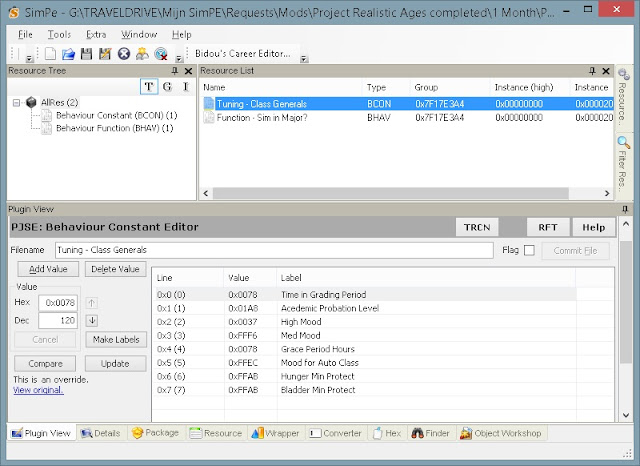
"I'm so proud of what I just made that I want to upload it. Can I?"
Only if you follow these terms:
If you have any questions about this policy, ask first!
Additional credits
It's very important that you credit the correct people when uploading. So, please, don't forget to thank and link back to this blog http://bit.ly/Sims2Idea if you decide to upload your creation.
All people who helped making this possible, Delphy, Inge Jones.
I accept requests full time!
If you have a request please go here: http://bit.ly/dorequest
Please, don't upload these creations anywhere. If you want to share them, share by the button Twitter, Facebook,...
Or share this link anywhere: http://bit.ly/Sims2Idea
A lot of people still ask me to create a new lifespan, universityspan, skillspan,.. to their liking. First I just didn't upload the spans anymore as it's hard to name them to keep them apart. But I still created the spans people asked me to do, I just didn't upload them anymore.
But as there are so many possibilities and so many people with different likings on this, I decided to write a tutorial about it so everyone can experiment to their own joy.
There are 7 tutorials. One for every span possible.
- New Tutorial: Create A New Pets Pregnancyspan
- New Tutorial: Create A New Pregnancyspan
- New Tutorial: Create A New Seasonspan
- New Tutorial: Create A New Universityspan
- New Tutorial: Create A New Lifespan
- New Tutorial: Create A New Skillspan
- New Tutorial: Create A New Petslifespan
So let's get started
First of all you need SimPE. The correct version can be found here: http://sims.ambertation.de/en/
You don't need a basic SimPE skill as this is very very simple to do.
Tutorial
First download this template:
When you open this mod, you'll see some files in the Resource List you can change:

- Press the Behaviour Constant (BCON) in the Resource Tree (on the left)
- Go to Tuning - Class Generals
- Then in Plugin View you can see a few lines. You only need to change the following one:
- Line 0x0 (0) Time in Grading Period
- On the left you see Hex (for hexadecimal numbers) and Dec (for decimal numbers)
- Just change the value (in hours) there and press the button Commit File (on the right)
That's it! Don't forget to save your package while giving it a new filename and test it out in game.
If you have any questions about this tutorial, don't hesitate to ask!
If you have any questions about this tutorial, don't hesitate to ask!
I hope you enjoyed this small tutorial and, please, follow my policy if you decide to share your package.
"I'm so proud of what I just made that I want to upload it. Can I?"
Only if you follow these terms:
- Only upload on this blog or on MTS.
- Not ever on a paysite (even if it has a free section) or to the exchange!
- Credit me (LientebollemeiS2I) and this blog http://bit.ly/Sims2Idea for the tutorial so others can learn how to create their own custom content.
If you have any questions about this policy, ask first!
Additional credits
It's very important that you credit the correct people when uploading. So, please, don't forget to thank and link back to this blog http://bit.ly/Sims2Idea if you decide to upload your creation.
All people who helped making this possible, Delphy, Inge Jones.
I accept requests full time!
If you have a request please go here: http://bit.ly/dorequest
Please, don't upload these creations anywhere. If you want to share them, share by the button Twitter, Facebook,...
Or share this link anywhere: http://bit.ly/Sims2Idea
Thursday, October 27, 2016
New Tutorial: Create a new seasonspan
Why just now?
A lot of people still ask me to create a new lifespan, universityspan, skillspan,.. to their liking. First I just didn't upload the spans anymore as it's hard to name them to keep them apart. But I still created the spans people asked me to do, I just didn't upload them anymore.
But as there are so many possibilities and so many people with different likings on this, I decided to write a tutorial about it so everyone can experiment to their own joy.
There are 7 tutorials. One for every span possible.
So let's get started
First of all you need SimPE. The correct version can be found here: http://sims.ambertation.de/en/
You don't need a basic SimPE skill as this is very very simple to do.
Seasonspan
You, of course, need EP5 Seasons in order for this to work.
Tutorial
First download this template:
When you open this mod, you'll see one file in the Resource List you can change:

"I'm so proud of what I just made that I want to upload it. Can I?"
Only if you follow these terms:
If you have any questions about this policy, ask first!
Additional credits
It's very important that you credit the correct people when uploading. So, please, don't forget to thank and link back to this blog http://bit.ly/Sims2Idea if you decide to upload your creation.
All people who helped making this possible, Delphy, Inge Jones.
I accept requests full time!
If you have a request please go here: http://bit.ly/dorequest
Please, don't upload these creations anywhere. If you want to share them, share by the button Twitter, Facebook,...
Or share this link anywhere: http://bit.ly/Sims2Idea
A lot of people still ask me to create a new lifespan, universityspan, skillspan,.. to their liking. First I just didn't upload the spans anymore as it's hard to name them to keep them apart. But I still created the spans people asked me to do, I just didn't upload them anymore.
But as there are so many possibilities and so many people with different likings on this, I decided to write a tutorial about it so everyone can experiment to their own joy.
There are 7 tutorials. One for every span possible.
- New Tutorial: Create A New Pets Pregnancyspan
- New Tutorial: Create A New Pregnancyspan
- New Tutorial: Create A New Seasonspan
- New Tutorial: Create A New Universityspan
- New Tutorial: Create A New Lifespan
- New Tutorial: Create A New Skillspan
- New Tutorial: Create A New Petslifespan
So let's get started
First of all you need SimPE. The correct version can be found here: http://sims.ambertation.de/en/
You don't need a basic SimPE skill as this is very very simple to do.
Seasonspan
You, of course, need EP5 Seasons in order for this to work.
Tutorial
First download this template:
When you open this mod, you'll see one file in the Resource List you can change:

- Press the Behaviour Constant (BCON) in the Resource Tree (on the left)
- Go to Seasons - Season Lengths
- Then in Plugin View you can see 4 lines. One for each season (see the labels).
- On the left you see Hex (for hexadecimal numbers) and Dec (for decimal numbers)
- Just change the value (in days) there and press the button Commit File (on the right)
That's it! Don't forget to save your package while giving it a new filename and test it out in game.
If you have any questions about this tutorial, don't hesitate to ask!
If you have any questions about this tutorial, don't hesitate to ask!
I hope you enjoyed this small tutorial and, please, follow my policy if you decide to share your package.
"I'm so proud of what I just made that I want to upload it. Can I?"
Only if you follow these terms:
- Only upload on this blog or on MTS.
- Not ever on a paysite (even if it has a free section) or to the exchange!
- Credit me (LientebollemeiS2I) and this blog http://bit.ly/Sims2Idea for the tutorial so others can learn how to create their own custom content.
If you have any questions about this policy, ask first!
Additional credits
It's very important that you credit the correct people when uploading. So, please, don't forget to thank and link back to this blog http://bit.ly/Sims2Idea if you decide to upload your creation.
All people who helped making this possible, Delphy, Inge Jones.
I accept requests full time!
If you have a request please go here: http://bit.ly/dorequest
Please, don't upload these creations anywhere. If you want to share them, share by the button Twitter, Facebook,...
Or share this link anywhere: http://bit.ly/Sims2Idea
Wednesday, October 26, 2016
New clothing: Short Dress Boots - Wavy Green Flash 2016
This is a dress made for Young Adult Females and Adult Female sims.
This is a recolor from the Short Dress Boots of the Base Game.
The color is a palette made by me at www.colourlovers.com and is named Green Flash 2016 as it is one of the trendy colors of 2016.
The pattern is also found at www.colourlovers.com and is named Wavy.
Screenshot:

This is a recolor from the Short Dress Boots of the Base Game.
The color is a palette made by me at www.colourlovers.com and is named Green Flash 2016 as it is one of the trendy colors of 2016.
The pattern is also found at www.colourlovers.com and is named Wavy.
Screenshot:

Download:
Credit:
Monday, October 24, 2016
New Tutorial: Create A New Pregnancyspan
Why just now?
A lot of people still ask me to create a new lifespan, universityspan, skillspan,.. to their liking. First I just didn't upload the spans anymore as it's hard to name them to keep them apart. But I still created the spans people asked me to do, I just didn't upload them anymore.
But as there are so many possibilities and so many people with different likings on this, I decided to write a tutorial about it so everyone can experiment to their own joy.
There are 7 tutorials. One for every span possible.
So let's get started
First of all you need SimPE. The correct version can be found here: http://sims.ambertation.de/en/
You don't need a basic SimPE skill as this is very very simple to do.
Pregnancyspan
You need EP3 OFB for this. I don't know why. It's just needed.
It might work without, because I think EP3 is needed because of the other values you can change and that it's not about the sims pregnancy.
Tutorial
First download the template:
http://simfileshare.net/folder/108529/
When you open this mod, you'll see many many things you can change:

"I'm so proud of what I just made that I want to upload it. Can I?"
Only if you follow these terms:
If you have any questions about this policy, ask first!
Additional credits
It's very important that you credit the correct people when uploading. So, please, don't forget to credit Zirconia Wolf and also thank and link back to this blog http://bit.ly/Sims2Idea if you decide to upload your creation.
All people who helped making this possible, Delphy, Inge Jones, Zirconia Wolf
A lot of people still ask me to create a new lifespan, universityspan, skillspan,.. to their liking. First I just didn't upload the spans anymore as it's hard to name them to keep them apart. But I still created the spans people asked me to do, I just didn't upload them anymore.
But as there are so many possibilities and so many people with different likings on this, I decided to write a tutorial about it so everyone can experiment to their own joy.
There are 7 tutorials. One for every span possible.
- New Tutorial: Create A New Pets Pregnancyspan
- New Tutorial: Create A New Pregnancyspan
- New Tutorial: Create A New Seasonspan
- New Tutorial: Create A New Universityspan
- New Tutorial: Create A New Lifespan
- New Tutorial: Create A New Skillspan
- New Tutorial: Create A New Petslifespan
So let's get started
First of all you need SimPE. The correct version can be found here: http://sims.ambertation.de/en/
You don't need a basic SimPE skill as this is very very simple to do.
Pregnancyspan
You need EP3 OFB for this. I don't know why. It's just needed.
It might work without, because I think EP3 is needed because of the other values you can change and that it's not about the sims pregnancy.
Tutorial
First download the template:
http://simfileshare.net/folder/108529/
When you open this mod, you'll see many many things you can change:

- Press the Behaviour Constant (BCON) in the Resource Tree (on the left)
- Go to Global Tuning
- Then in Plugin View you can see a lot of lines. You only need to change the following lines:
- Line 0x32 (50) Pregnancy - Hours Til Showing
- Line 0x33 (51) Pregnancy - Hours Til Full Show
- Line 0x34 (52) Pregnancy - Hours Til Birth
- On the left you see Hex (for hexadecimal numbers) and Dec (for decimal numbers)
- Just change the value (in hours) there and press the button Commit File (on the right)
In order to know what amount of hours you need to fill in, you have to do some mathematice.
In case of my Project Realistic Ages 1 month (which has the same values as the template) it's the following:
First trimester (impregnation to first morth): 50 hours (2 days and 2 hours)
Second trimester (first morth to second morth): 110 hours (4 days and 14 hours)
Third trimester (second morth to birth: 60 hours (2 days and 12 hours)
Second trimester (first morth to second morth): 110 hours (4 days and 14 hours)
Third trimester (second morth to birth: 60 hours (2 days and 12 hours)
- So Line 0x32 (50) is 50 hours
- Line 0x33 (51) is 50+110 = 160 hours (in total from impregnation until Full Show)
- Line 0x34 (52) is 50+110+60 = 220 hours (in total from impregnation until Birth)
That's it! Don't forget to save your package while giving it a new filename and test it out in game.
If you have any questions about this tutorial, don't hesitate to ask!
If you have any questions about this tutorial, don't hesitate to ask!
- You can take a look and change other lines too, but that's at your own risk. The label says clearly what the value will change, though.
- E.g.: Line 0x04 (4) changes the maximum number of family members
I hope you enjoyed this small tutorial and, please, follow my policy if you decide to share your package.
"I'm so proud of what I just made that I want to upload it. Can I?"
Only if you follow these terms:
- Only upload on this blog or on MTS.
- Not ever on a paysite (even if it has a free section) or to the exchange!
- Credit me (LientebollemeiS2I) and this blog http://bit.ly/Sims2Idea for the tutorial so others can learn how to create their own custom content.
If you have any questions about this policy, ask first!
Additional credits
It's very important that you credit the correct people when uploading. So, please, don't forget to credit Zirconia Wolf and also thank and link back to this blog http://bit.ly/Sims2Idea if you decide to upload your creation.
All people who helped making this possible, Delphy, Inge Jones, Zirconia Wolf
Sunday, October 23, 2016
New Pet Pregnancyspan: Project 1 simsweek = 1 real month
Original upload
The original upload with all the mods except the mod pet pregnancyspan can be find here: http://bit.ly/PRA1SimsWeekIS1RealMonthS2I
If you're in doubt or have any questions, please, use the commentsection of this blogpost to ask.
Screenshot

Additional Credits:
All people who helped making this possible, Inge Jones, Zirconia Wolf
The original upload with all the mods except the mod pet pregnancyspan can be find here: http://bit.ly/PRA1SimsWeekIS1RealMonthS2I
If you're in doubt or have any questions, please, use the commentsection of this blogpost to ask.
Screenshot

Download:
You can find it under: Project & Themes > Project Realistic Ages
This download just includes the mod for the pet pregnancyspan.
The other mods or this project can be find here: http://bit.ly/PRA1SimsWeekIS1RealMonthS2I
Tutorial
If you want to create pet pregnancyspans yourself, you can find my tutorial here: http://bit.ly/TutPetsPregnancy
All people who helped making this possible, Inge Jones, Zirconia Wolf
Saturday, October 22, 2016
New clothing: Short Dress Boots - Pattern8 Buttercup 2016
This is a dress made for Young Adult Females and Adult Female sims.
This is a recolor from the Short Dress Boots of the Base Game.
The color is a palette made by me at www.colourlovers.com and is named Buttercup 2016 as it is one of the trendy colors of 2016.
The pattern is also found at www.colourlovers.com and is named Pattern8.
Screenshot:

This is a recolor from the Short Dress Boots of the Base Game.
The color is a palette made by me at www.colourlovers.com and is named Buttercup 2016 as it is one of the trendy colors of 2016.
The pattern is also found at www.colourlovers.com and is named Pattern8.
Screenshot:

Download:
Credit:
Friday, October 21, 2016
New clothing: Short Dress Boots - Pattern8 Serenity 2016
This is a dress made for Young Adult Females and Adult Female sims.
This is a recolor from the Short Dress Boots of the Base Game.
The color is a palette made by me at www.colourlovers.com and is named Green Flash 2016 as it is one of the trendy colors of 2016.
The pattern is also found at www.colourlovers.com and is named Pattern8.
Screenshot:

This is a recolor from the Short Dress Boots of the Base Game.
The color is a palette made by me at www.colourlovers.com and is named Green Flash 2016 as it is one of the trendy colors of 2016.
The pattern is also found at www.colourlovers.com and is named Pattern8.
Screenshot:

Download:
Credit:
Thursday, October 20, 2016
New Pet Pregnancyspan: Project Realistic Ages 1 day
Original upload
The original upload with all the mods except the mod petpregnancyspan can be find here: http://bit.ly/1uUpxx2
If you're in doubt or have any questions, please, use the commentsection of this blogpost to ask.
Screenshot

Additional Credits:
All people who helped making this possible, Inge Jones, Zirconia Wolf
The original upload with all the mods except the mod petpregnancyspan can be find here: http://bit.ly/1uUpxx2
If you're in doubt or have any questions, please, use the commentsection of this blogpost to ask.
Screenshot

Download:
You can find it under: Project & Themes > Project Realistic Ages
This download just includes the mod for the pet pregnancyspan.
The other mods or this project can be find here: http://bit.ly/1uUpxx2
Tutorial
If you want to create pet pregnancyspans yourself, you can find my tutorial here: http://bit.ly/TutPetsPregnancy
All people who helped making this possible, Inge Jones, Zirconia Wolf
Wednesday, October 19, 2016
New clothing: Dress - Wind Spun Iced Coffee 2016
This is a dress made for Young Adult Females and Adult Female sims.
This is a recolor from the Dress of the Base Game.
The color is a palette made by me at www.colourlovers.com and is named Iced Coffee 2016 as it is one of the trendy colors of 2016.
The pattern is also found at www.colourlovers.com and is named Wind Spun.
Screenshot:

This is a recolor from the Dress of the Base Game.
The color is a palette made by me at www.colourlovers.com and is named Iced Coffee 2016 as it is one of the trendy colors of 2016.
The pattern is also found at www.colourlovers.com and is named Wind Spun.
Screenshot:

Download:
Credit:
Tuesday, October 18, 2016
New clothing: Short Dress Boots - Pattern8 Snorkel Blue 2016
This is a dress made for Young Adult Females and Adult Female sims.
This is a recolor from the Short Dress Boots of the Base Game.
The color is a palette made by me at www.colourlovers.com and is named Snorkel Blue 2016 as it is one of the trendy colors of 2016.
The pattern is also found at www.colourlovers.com and is named Pattern8.
Screenshot:

This is a recolor from the Short Dress Boots of the Base Game.
The color is a palette made by me at www.colourlovers.com and is named Snorkel Blue 2016 as it is one of the trendy colors of 2016.
The pattern is also found at www.colourlovers.com and is named Pattern8.
Screenshot:

Download:
Credit:
Monday, October 17, 2016
New Pet Pregnancyspan: Project Realistic Ages 1 month
Original upload
The original upload with all the mods except the mod petpregnancyspan can be find here: http://bit.ly/1bcltPp
If you're in doubt or have any questions, please, use the commentsection of this blogpost to ask.
Screenshot

Additional Credits:
All people who helped making this possible, Inge Jones, Zirconia Wolf
The original upload with all the mods except the mod petpregnancyspan can be find here: http://bit.ly/1bcltPp
If you're in doubt or have any questions, please, use the commentsection of this blogpost to ask.
Screenshot

Download:
You can find it under: Project & Themes > Project Realistic Ages
This download just includes the mod for the pet pregnancyspan.
The other mods or this project can be find here: http://bit.ly/1bcltPp
Tutorial
If you want to create pet pregnancyspans yourself, you can find my tutorial here: http://bit.ly/TutPetsPregnancy
All people who helped making this possible, Inge Jones, Zirconia Wolf
New Tutorial: Create a new PETS pregnancyspan
Why just now?
A lot of people still ask me to create a new lifespan, universityspan, skillspan,.. to their liking. First I just didn't upload the spans anymore as it's hard to name them to keep them apart. But I still created the spans people asked me to do, I just didn't upload them anymore.
But as there are so many possibilities and so many people with different likings on this, I decided to write a tutorial about it so everyone can experiment to their own joy.
There are 7 tutorials. One for every span possible.
So let's get started
First of all you need SimPE. The correct version can be found here: http://sims.ambertation.de/en/
You don't need a basic SimPE skill as this is very very simple to do.
Pets pregnancyspan
You need EP4 Pets for this (obviously).
Tutorial
First download this template:
When you open this mod, you'll see just two things you can change:

"I'm so proud of what I just made that I want to upload it. Can I?"
Only if you follow these terms:
If you have any questions about this policy, ask first!
Additional credits
It's very important that you credit the correct people when uploading. So, please, don't forget to credit Zirconia Wolf and also thank and link back to this blog http://bit.ly/Sims2Idea if you decide to upload your creation.
All people who helped making this possible, Delphy, Inge Jones, Zirconia Wolf
I accept requests full time!
If you have a request please go here: http://bit.ly/dorequest
Please, don't upload these creations anywhere. If you want to share them, share by the button Twitter, Facebook,...
Or share this link anywhere: http://bit.ly/Sims2Idea
A lot of people still ask me to create a new lifespan, universityspan, skillspan,.. to their liking. First I just didn't upload the spans anymore as it's hard to name them to keep them apart. But I still created the spans people asked me to do, I just didn't upload them anymore.
But as there are so many possibilities and so many people with different likings on this, I decided to write a tutorial about it so everyone can experiment to their own joy.
There are 7 tutorials. One for every span possible.
- New Tutorial: Create A New Pets Pregnancyspan
- New Tutorial: Create A New Pregnancyspan
- New Tutorial: Create A New Seasonspan
- New Tutorial: Create A New Universityspan
- New Tutorial: Create A New Lifespan
- New Tutorial: Create A New Skillspan
- New Tutorial: Create A New Petslifespan
So let's get started
First of all you need SimPE. The correct version can be found here: http://sims.ambertation.de/en/
You don't need a basic SimPE skill as this is very very simple to do.
Pets pregnancyspan
You need EP4 Pets for this (obviously).
Tutorial
First download this template:
When you open this mod, you'll see just two things you can change:

- Press the Behaviour Constant (BCON) in the Resource Tree (on the left)
- Go to Tuning - Pet Pregnancy
- Then in Plugin View you can see two lines.
- One for the Minimum Hours Before Birth
- And one fot the Maximum Hours Before Birth
- On the left you see Hex (for hexadecimal numbers) and Dec (for decimal numbers)
- Just change the value (in hours) there and press the button Commit File (on the right)
That's it! Don't forget to save your package while giving it a new filename and test it out in game.
If you have any questions about this tutorial, don't hesitate to ask!
If you have any questions about this tutorial, don't hesitate to ask!
I hope you enjoyed this small tutorial and, please, follow my policy if you decide to share your package.
"I'm so proud of what I just made that I want to upload it. Can I?"
Only if you follow these terms:
- Only upload on this blog or on MTS.
- Not ever on a paysite (even if it has a free section) or to the exchange!
- Credit me (LientebollemeiS2I) and this blog http://bit.ly/Sims2Idea for the tutorial so others can learn how to create their own custom content.
If you have any questions about this policy, ask first!
Additional credits
It's very important that you credit the correct people when uploading. So, please, don't forget to credit Zirconia Wolf and also thank and link back to this blog http://bit.ly/Sims2Idea if you decide to upload your creation.
All people who helped making this possible, Delphy, Inge Jones, Zirconia Wolf
I accept requests full time!
If you have a request please go here: http://bit.ly/dorequest
Please, don't upload these creations anywhere. If you want to share them, share by the button Twitter, Facebook,...
Or share this link anywhere: http://bit.ly/Sims2Idea
Sunday, October 16, 2016
New clothing: Short Dress Boots - Pattern8 Fiesta 2016
This is a dress made for Young Adult Females and Adult Female sims.
This is a recolor from the Short Dress Boots of the Base Game.
The color is a palette made by me at www.colourlovers.com and is named Fiesta 2016 as it is one of the trendy colors of 2016.
The pattern is also found at www.colourlovers.com and is named Pattern8.
Screenshot:

This is a recolor from the Short Dress Boots of the Base Game.
The color is a palette made by me at www.colourlovers.com and is named Fiesta 2016 as it is one of the trendy colors of 2016.
The pattern is also found at www.colourlovers.com and is named Pattern8.
Screenshot:

Download:
Credit:
Subscribe to:
Posts (Atom)